From entering a web address to the first pixel: what DNS, DoH, ECH, QUIC/TLS, HTTP/3, CDNs, and browser rendering actually do, with measurements from tutorijali.app.
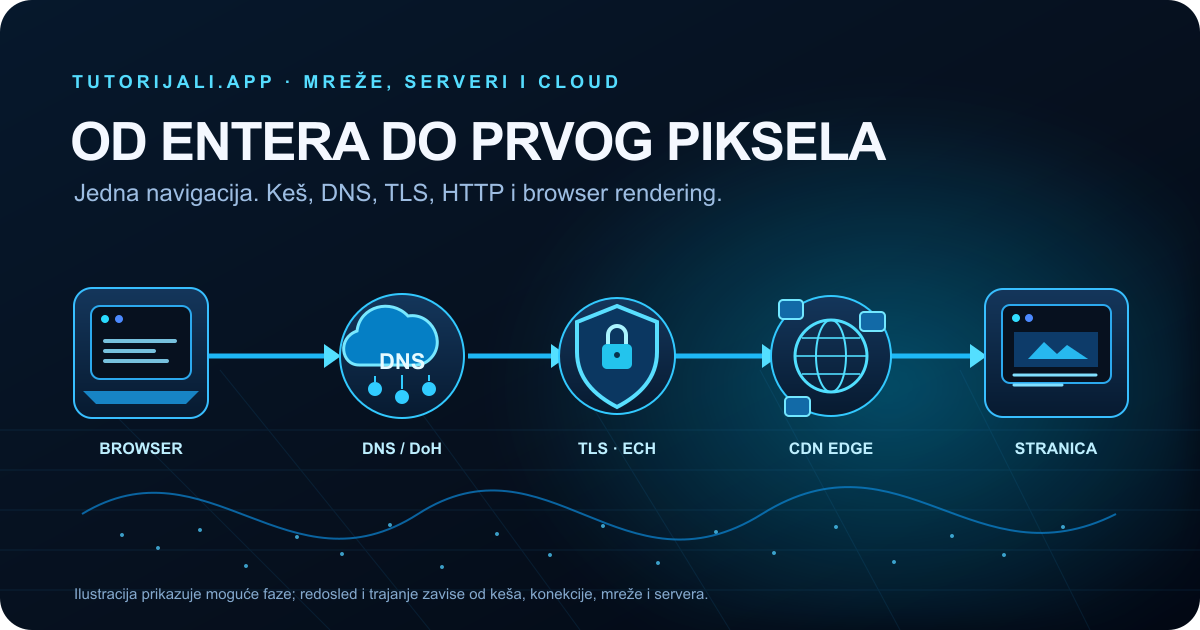
The cover image is schematic. It does not show measured phases or guaranteed timings.
Updated: October 5, 2026.
From a single browser input to DNS resolution, an encrypted QUIC connection, a CDN edge, the first HTML bytes, and pixels on the screen.
A user enters tutorijali.app in the address bar and presses Enter. The page appears shortly afterward. Between those two actions, the browser may check several caches, find or reuse a network connection, negotiate encryption, send a request to an edge node, receive HTML, and begin rendering it. Some phases are skipped, some overlap, and some happen in parallel.
That makes “the first 500 ms” a useful way to tell the story, but it is not a stopwatch. 500 ms is neither a universal page load time nor a fixed protocol schedule. The actual result depends on browser and operating system caches, an existing connection, the DNS resolver, the network, geographic routing, packet loss, the edge node, the server, the content, and the device.
Interactive diagram
A request journey
Select a phase to see the participants, protocol, and what a measurement can and cannot show.
The 500 ms label is a narrative frame. This animation shows a possible sequence of phases, not a guaranteed duration.
Select any phase. The time intervals are not universal.
Possible phase, not a fixed slot
Address and navigation
The browser interprets the input, separates the scheme, host, and path, and applies security rules.
Protocol
No network protocol is involved until the browser decides a request is needed.
Privacy
A fragment after the # symbol stays in the browser and is not sent in the HTTP request.
DevTools
Network shows only requests that actually happen after navigation.
Wireshark
Before the first network packet, this navigation has no DNS, TLS, or HTTP traffic.
Live browser API
Measure this navigation
Data stays in this tab. PerformanceNavigationTiming describes a document load. During in-app navigation, it may refer to the previous document rather than the route change.
500 ms as a map, not a schedule
The timeline above shows phases that may occur during a page load. It does not claim that DNS always takes 80 ms, that ECH follows DNS at an exact moment, or that the CDN must contact the origin. The browser may already have a valid DNS response and an open HTTP/2 or HTTP/3 connection. A Service Worker may return a response without going to the network. The CDN may return cached content. The parser can begin processing HTML before the whole document has downloaded.
More work really does fit between Enter and the first response in a colder scenario. A warmer scenario skips or reuses some of that work. “Cold” and “warm” therefore need a description of their conditions: the HTTP cache may be empty while the DNS cache and connection are still warm; opening DevTools can disable the HTTP cache without necessarily clearing the system resolver or removing every QUIC parameter learned earlier.
How the browser interprets the address
The address bar is more than a text field for URLs. The browser decides whether the input is an address or a search, parses the scheme, hostname, port, path, and query parameters, and then applies navigation rules. In https://tutorijali.app/post/..., a fragment such as #sources stays in the browser and is not sent to the server in the HTTP request.
Before making a network request, the browser may check an HSTS rule, history, pre-cached resources, extensions, a Service Worker, and an existing connection. HSTS requires HTTPS for covered hosts, but that is not the same as a general rule that every text input automatically becomes the same request. The omnibox may suggest a search, and the browser may upgrade a navigation to a more secure scheme according to its local policy.
The HTTP cache, Service Worker, DNS cache, and connection pool are separate things. If the server response is still fresh in the HTTP cache, the browser may not send a new request for that resource. If an existing connection is still usable, the browser can send the request over it without establishing TCP or QUIC again. Those cases also change what a reader sees in DevTools.
How a domain name becomes a destination
DNS is a distributed system of records. The browser or system resolver looks up information for a host, usually address records such as A for IPv4 and AAAA for IPv6. In practice, an answer may come from several cache layers: the browser, operating system, local network device, or recursive resolver.
When a resolver already has a valid answer, the full path through root, TLD, and authoritative servers is not repeated for every request. If it lacks the information, a recursive resolver can follow delegations and obtain the answer itself. The browser usually asks its configured resolver rather than contacting a root server directly. The TTL in DNS records limits how long an answer may remain cached; real implementations apply additional policies.
Browsers and operating systems may look up IPv4, IPv6, or additional records in parallel. If multiple destinations are available, address-selection mechanisms may try different paths. For that reason, one “DNS Lookup” row in the Network panel is not necessarily a complete record of every DNS activity that influenced navigation.
DNS and DNS over HTTPS solve different problems
DNS describes queries and answers for domain names. DNS over HTTPS (DoH) describes a way to carry DNS messages over an HTTPS connection to a chosen DoH resolver. Similarly, DNS over TLS (DoT) and DNS over QUIC (DoQ) use other encrypted transports. DoH does not change the meaning of A or AAAA records. It protects the channel between the DoH client and that resolver.
An encrypted channel makes it harder for a local network observer to read the specific DNS query. The resolver receiving the query still processes the domain name, and the destination IP address and other traffic patterns may remain visible. DoH is therefore not a synonym for anonymity. DNSSEC solves a different problem: cryptographic authentication of DNS data. DoH and DNSSEC are independent and can be used together.
HTTPS/SVCB records and ECH configuration
HTTPS and SVCB are DNS records that can describe an available service, such as an alternative hostname, port, ALPN protocols, and other parameters. In a suitable configuration, they can also carry ECH configuration. This is one possible way to obtain the settings, not a mandatory extra step in every page load.
Encrypted Client Hello (ECH) lets the browser encrypt the inner ClientHello for the server. This protects SNI (Server Name Indication) and some other TLS handshake fields. An outer ClientHello still exists, and ECH is designed so multiple services can belong to the same anonymity set. Protection therefore depends on configuration, client support, and server acceptance.
ECH does not hide the IP address, does not hide all metadata, and does not prevent the resolver from seeing the name it was asked to look up. If ECH configuration is unavailable or the server rejects it, the outcome is not equivalent to ECH being successfully accepted. RFC 9849 for TLS Encrypted Client Hello was published in March 2026, and RFC 9848 describes bootstrapping ECH through DNS Service Binding records.
QUIC, TLS 1.3, and HTTP/3 form a connected path
When the browser needs a new connection, two common cases are:
- HTTP/3 uses QUIC, a standardized transport over UDP. QUIC uses TLS 1.3 or later for its cryptographic handshake, and the negotiated ALPN protocol may be h3.
- HTTP/2 is most often used over TCP and TLS. Its ALPN value may be h2.
It is not accurate to picture a QUIC handshake followed by a separate, fully sequential TLS handshake as two independent connections. TLS messages are integrated into the QUIC handshake. If HTTP/3 is unavailable or the UDP path does not work, the browser may use another offered protocol. Support and selection should be checked on the actual connection, not inferred from the mere presence of TLS.
QUIC multiplexes streams, so a lost packet belonging to one stream does not have to stop every other stream in the same way that loss in a single TCP connection can. Delays from retransmission, congestion, the server, and the device still exist. HTTP/3 can help on some networks, but it is not always faster than HTTP/2. The result depends on latency, packet loss, implementation, and whether the connection is new or reused.
TLS 1.3 and QUIC support session resumption. In some cases, the client can send 0-RTT data before completing a new handshake. This is not universally available or safe for every request: the server must allow early data, and replay attacks are possible. The application protocol must limit which requests are eligible for this kind of transmission.
The request reaches an edge, a cache, or the origin
Once the destination and a usable connection are known, the browser sends an HTTP request. With HTTPS, request headers and the body are encrypted between the ends of the TLS connection. They may be visible in the browser, DevTools, and server depending on access and configuration; a passive observer of ordinary TLS traffic does not receive them as readable text.
A CDN connects content to distributed edge locations and caching systems. Traffic may reach an edge selected by network routing, anycast, and provider rules, not necessarily the node that is geographically closest in a straight line. For a cacheable request, the edge may return a HIT. With a MISS or dynamic content, it may contact the origin, obtain a response, and return it to the browser. Personalized content, cookies, Cache-Control, Vary, authorization, and platform configuration all affect the result.
“Origin” means the logical source of the content. It does not have to be a single physical machine directly reachable from the internet. A CDN can terminate TLS, forward the request to another layer, or use a different route depending on the path. Response headers may offer clues, but one header is not a complete map of the architecture.
What TTFB measures and what it does not
Time to First Byte (TTFB) measures the time from the start of navigation until the browser receives the first response byte of the document. In the Navigation Timing API, it is calculated as responseStart - startTime. The value can therefore include redirects, DNS, connection setup, TLS/QUIC handshaking, sending the request, and waiting for the response to begin.
TTFB is not pure server processing time. Some of the time may be spent traveling to and from the edge, and a Service Worker or local cache may change what is measured. The DevTools label “Waiting (TTFB)” describes waiting for the first byte after sending the request, while TTFB for the main navigation often represents a wider interval. Browsers and panels do not group every phase identically.
One recorded load of tutorijali.app
In one Chrome load of https://tutorijali.app/tutorijali, recorded on October 5, 2026, PerformanceNavigationTiming.nextHopProtocol returned h2. The same measurement produced these values:
| Metric | Recorded value |
|---|---|
| DNS interval | 80.3 ms |
| Total connection time | 65.6 ms |
| Request to first byte | 28.0 ms |
| Navigation TTFB | 181.1 ms |
| DOMContentLoaded | 272.1 ms |
| load event | 429.2 ms |
| Transferred in the Navigation Timing entry | 44,883 B, approximately 43.8 KiB |
| Encoded document body | 44,583 B, approximately 43.5 KiB |
This is one browser, one route, and one network session. These results are not expected values for every reader, and they do not prove that HTTP/3 is never available. They only confirm that this navigation used h2. The browser Performance API also does not confirm whether ECH was accepted. A cold/warm pair, a Firefox result, and repeated measurements were not recorded for this sample; the procedure below makes it possible to collect them separately under controlled conditions.
A Windows Resolve-DnsName query during the investigation returned A records 64.29.17.2 and 216.198.79.66, both with a TTL of 1800 seconds. Queries for AAAA and CNAME did not return a corresponding Answer record. A Cloudflare DoH query for HTTPS and SVCB records for tutorijali.app also returned no Answer record. These are responses from two specific resolvers at one point in time. They do not rule out another DNS path, an alternative way of delivering ECH configuration, or a later record change.
A separate curl.exe -I -L HTTP HEAD request to the main address returned HTTP/1.1 200 with the Server: Vercel and X-Vercel-Cache: STALE headers. That is one response to HEAD, not proof that every GET, route, or cache key follows the same path. curl.exe --version in this environment does not list HTTP/2 or HTTP/3 support, so it could not verify those protocols. A later curl -vI attempt was stopped before the TLS handshake because the environment did not allow the TCP connection. As a result, TLS version, certificate details, redirect chain, and HTTP/3 support were not independently confirmed from this terminal.
How to read a Network waterfall
Chrome DevTools Network records requests made while the panel is monitoring a page. Each row represents a resource, and the Waterfall shows their timing in relation to one another. The document row usually represents the main HTML; rows for CSS, JavaScript, fonts, images, and API responses can overlap.
For one navigation, it is useful to review:
- Name and Type: which resource was requested and what kind it is;
- Status: the HTTP result, including a redirect, success, or error;
- Protocol: h2 or h3 for a particular request when the browser exposes it;
- Initiator: the code or resource that started the request;
- Size: the response size and any cache notes;
- Timing: DNS, connection start, request sending, waiting, and downloading when the browser can separate them.
Chrome may show DNS time as 0 when the answer was cached or DNS timing was not separated; a connection may also be reused. In Firefox Network Monitor, phase names and grouping may differ. Content protected by HTTPS remains encrypted on the network, while the browser's Network panel observes requests before or after encryption.
A neat waterfall does not prove that the phases are sequential. CSS and images may download in parallel, HTTP/2 and HTTP/3 may multiplex several streams, and the browser may send preconnect, prefetch, or preload requests before the parser reaches the relevant markup.
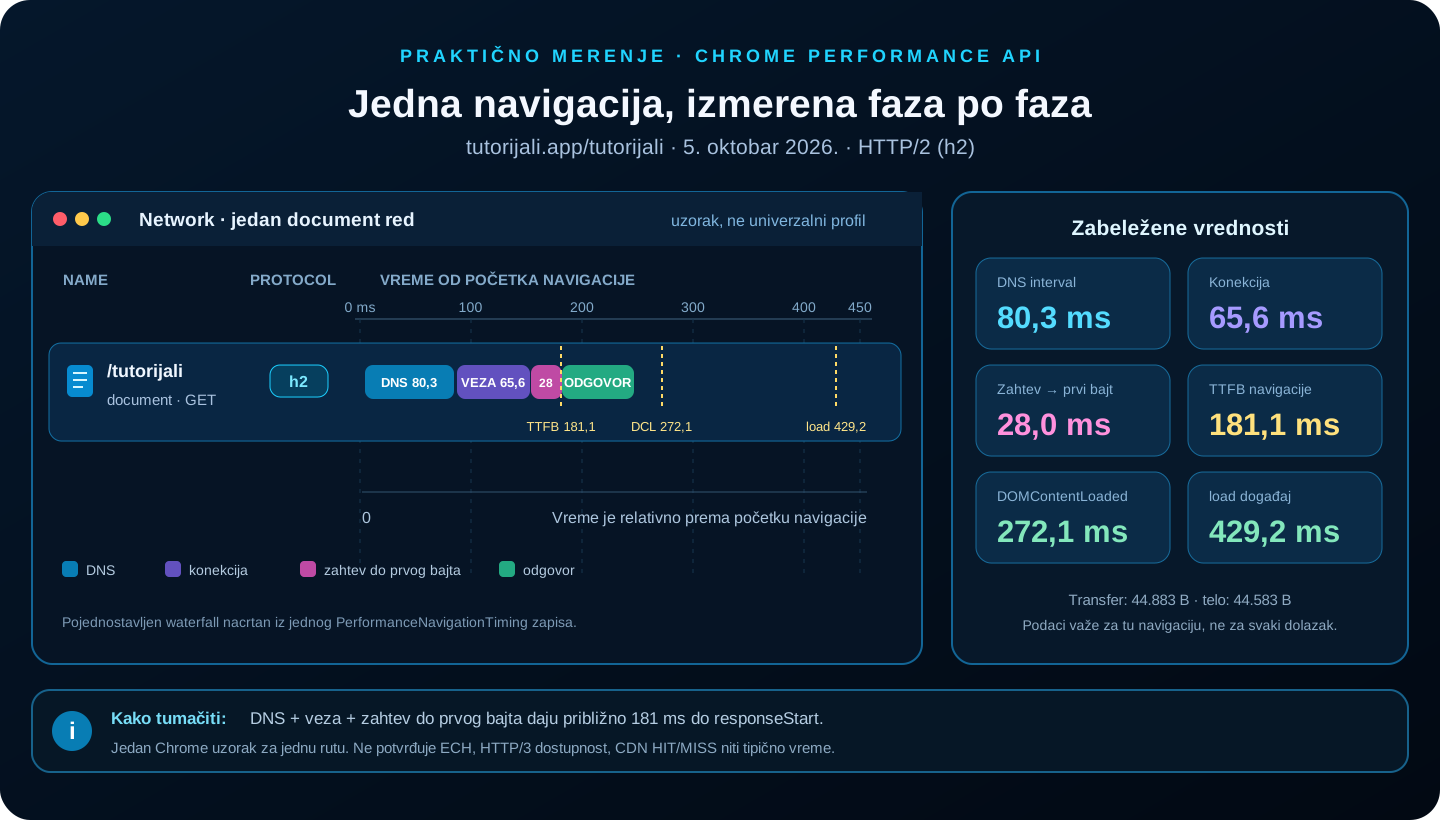
The values show one recorded navigation to /tutorijali. This is not a DevTools screenshot or a universal expectation.
Measure the moment the page appears
DOMContentLoaded, load, First Contentful Paint (FCP), and Largest Contentful Paint (LCP) answer different questions:
- DOMContentLoaded fires after the main HTML document has been parsed and the relevant deferred scripts have run. It does not wait for every image and subresource.
- load waits for dependent resources that participate in that event, but it does not say whether the page already felt fast to the user.
- FCP marks the first display of text, an image, or another content element.
- LCP tracks the rendering time of the largest relevant element in the visible area. The candidate can change while the page loads.
The browser may process HTML while bytes are still arriving. The HTML parser builds the DOM, CSS is processed into the CSSOM, and the browser may discover resources early. CSS can delay the first render, and a parser-blocking script can hold the parser. Style calculation is followed by layout, paint, and layer compositing. Browser implementations differ in detail; this breakdown is a useful model, not a required list of discrete stages.
First pixel, first contentful paint, and largest contentful paint are not synonyms. The browser may already show a heading while a large image is still downloading, or the page may change visually after FCP. The load event is not a substitute for Core Web Vitals.
A repeatable experiment in Chrome and Firefox
To compare colder and warmer loads, first record the same conditions: browser and version, route, network, time, cache setting, and whether there was an earlier request. One pass does not represent a typical result; repeated runs and the median provide a more useful picture.
Chrome DevTools
- Open DevTools before reloading and select Network.
- Enable Preserve log only when you need to keep rows across redirects or navigation.
- Show the Protocol column if it is hidden, then check for h2 or h3 on the main document row.
- With Disable cache enabled, repeat the navigation and record the main entry, Status, Size, and Timing. This option applies while DevTools is open.
- Turn Disable cache off and repeat the same URL to compare against the browser HTTP cache.
- In a separate run, use the Performance panel to review parsing, script work, FCP/LCP, and layout events.
Disable cache is not a complete “cold internet” switch: DNS cache, an existing connection, TLS resumption, QUIC state, edge cache, and operating system behavior may still matter. A temporary browser profile and a fresh process offer better isolation, with the caveat that caches in the system, resolver, and CDN may still be warm. Application → Service Workers can show whether a Service Worker is involved. Record a test that bypasses it as a separate condition.
Firefox Developer Tools
Firefox Network Monitor displays requests, a waterfall, status, size, and details such as DNS resolution, connecting, sending, waiting, and receiving. Firefox was not part of this measurement; this overview of its tools is for a separate comparison. The Security view also provides connection details for HTTPS requests. Column order and terminology are not exactly the same as in Chrome, so comparisons should rely on metric definitions, not identical button names.
Performance API in the console
This example reads metrics for the most recent document navigation in the active tab. It does not send data anywhere. The values stay in the browser unless the reader copies or forwards them.
const nav = performance.getEntriesByType('navigation')[0];
const paint = performance.getEntriesByType('paint');

console.table({
  protocol: nav?.nextHopProtocol || 'not exposed',
  dnsMs: nav ? nav.domainLookupEnd - nav.domainLookupStart : null,
  connectionMs: nav ? nav.connectEnd - nav.connectStart : null,
  requestToFirstByteMs: nav ? nav.responseStart - nav.requestStart : null,
  ttfbMs: nav ? nav.responseStart - nav.startTime : null,
  domContentLoadedMs: nav ? nav.domContentLoadedEventEnd - nav.startTime : null,
  loadMs: nav ? nav.loadEventEnd - nav.startTime : null,
  firstContentfulPaintMs:
    paint.find((entry) => entry.name === 'first-contentful-paint')?.startTime ?? null,
});
If DNS was cached or an existing connection was used, the DNS or connection interval may be zero. Zero does not necessarily mean that the protocol was absent. If navigation within a Next.js app moves to another route without reloading the document, Navigation Timing may still describe the original document. FCP can be read from a Paint Timing entry; LCP can be collected with a PerformanceObserver:
new PerformanceObserver((list) => {
  const candidate = list.getEntries().at(-1);
  if (candidate) console.log('LCP candidate:', candidate.startTime, candidate.element);
}).observe({ type: 'largest-contentful-paint', buffered: true });
For each sample, it is useful to save the route, time, browser, protocol, cache conditions, and whether a Service Worker was involved. One number without those conditions rarely explains the cause.
Terminal and DNS checks
curl --version shows which protocols the local curl build supports. You can check status and headers with a basic request, but the result of a HEAD request is not identical to a GET navigation.
curl.exe --version
curl.exe -I -L https://tutorijali.app/
curl.exe -sS -L -o NUL -w "http=%{http_version} status=%{http_code} dns=%{time_namelookup}s connect=%{time_connect}s tls=%{time_appconnect}s ttfb=%{time_starttransfer}s total=%{time_total}s`n" https://tutorijali.app/
You can add --http2 or --http3-only when the local build supports them. If an option is unavailable or QUIC/UDP is blocked, the error describes a probe limitation, not necessarily browser or server support. CLI TTFB and Chrome Navigation Timing are also different measurements.
Windows Resolve-DnsName can check common A and AAAA records:
Resolve-DnsName -Name tutorijali.app -Type A
Resolve-DnsName -Name tutorijali.app -Type AAAA
Support for the HTTPS record type in that command depends on the Windows DNS tool version. In the earlier check of this environment, an explicit DoH query to Cloudflare was used for the HTTPS record type. That is one resolver's response at one point in time, not a complete view of every browser or DNS path.
What Wireshark can and cannot see
A packet capture can show source and destination addresses, timing, packet sizes, unencrypted DNS queries, TCP/TLS streams, or UDP/QUIC streams. The exact view depends on the interface, filter, Wireshark version, protocol, and whether the client exported session keys.
In this environment, wireshark.exe and tshark.exe were not found in PATH, so no capture was recorded for tutorijali.app. The following describes protocol capabilities, not the result of a traffic capture from this site.
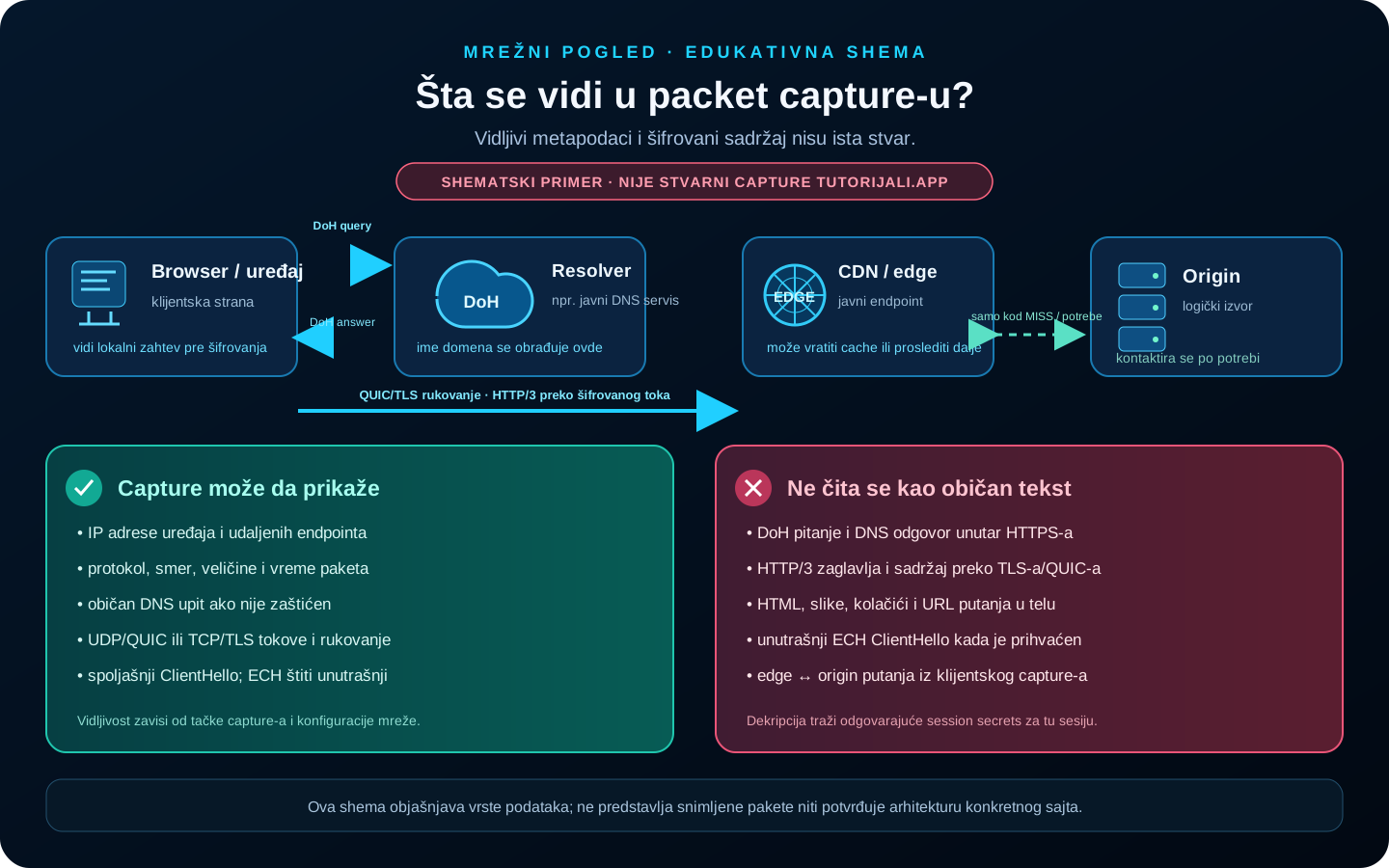
Schematic illustration, not a Wireshark capture of tutorijali.app. HTTP/3 headers and body remain encrypted without the relevant session secrets and decryption.
With HTTPS, the content of HTTP requests and responses is generally unreadable in a passive capture. Wireshark may decrypt a supported session when the relevant session secrets are available and the capture contains that same traffic. This is not the same as breaking TLS. QUIC also encrypts application data; visibility of some initial fields does not mean the HTML is plaintext.
A practical inspection may use display filters such as dns, tls, quic, tcp.port == 443, or udp.port == 443. With DoH, DNS content usually does not appear as an ordinary DNS packet. It appears as HTTPS traffic to the resolver. ECH protects the inner ClientHello, while outer metadata such as the IP address remains relevant.
A key log file can enable decryption for a supported browser and session, but it contains secrets that provide access to encrypted traffic from that session. Do not share that file or the related capture publicly. Use them only in a controlled test of your own traffic.
One diagram to wrap up
The following diagram summarizes one possible path. A cache may skip DNS or the network; HTTP/2 is a possible alternative to HTTP/3; the origin is contacted only when cache rules or the application require it. On a phone, tap the image to enlarge it.
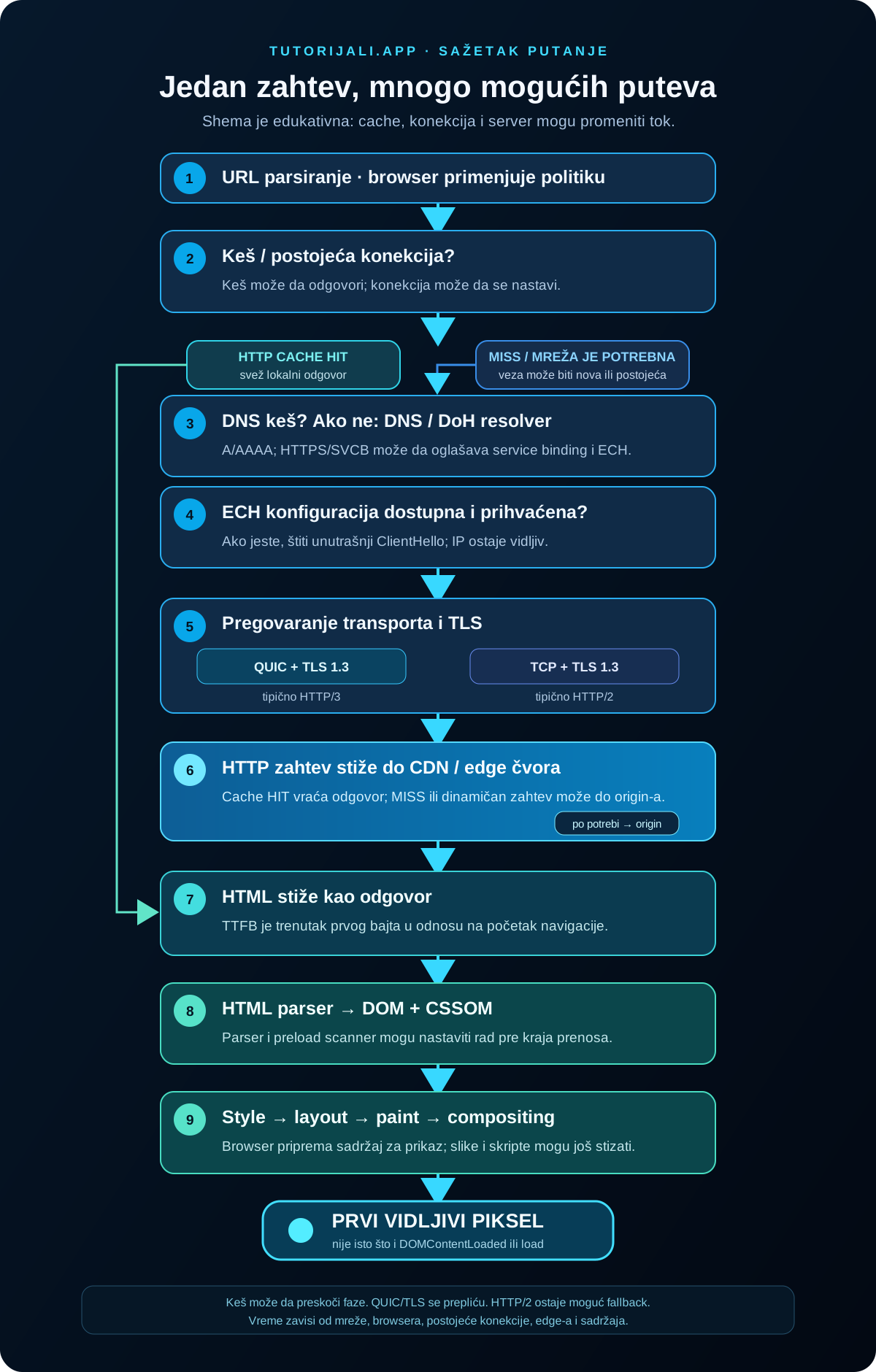
Schematic diagram of possible branches, not a timing measurement from one session.
tutorijali.app → URL parsing → browser / OS cache?
                                  ├─ response or existing connection
                                  └─ DNS cache? → DNS / DoH → HTTPS/SVCB → ECH?
                                                      → QUIC + TLS 1.3 / HTTP/3
                                                      or TCP + TLS / HTTP/2
                                                      → CDN edge → HIT or MISS → origin
                                                      → HTML → DOM + CSSOM → layout
                                                      → paint → compositing → pixel
Frequently asked questions
What happens first when you enter a web address?
The browser first parses the input and checks valid local state, security rules, and caches. DNS is not necessarily the first network event, and sometimes there is no new network event at all.
Does DNS always have to run?
No. The browser, operating system, or recursive resolver may already have a valid answer, and the browser may use an existing connection.
What is the difference between DNS and DoH?
DNS is a system of queries and records. DoH carries DNS messages over an HTTPS connection to a configured resolver; it does not provide anonymity by itself.
What does ECH hide?
ECH encrypts the inner ClientHello and protects SNI and other fields that could otherwise be visible. Protection depends on available configuration and server acceptance.
Does ECH hide the IP address?
No. A network observer can still see the IP address the device connected to, along with some traffic metadata.
Does HTTP/3 use TCP?
No. HTTP/3 uses QUIC, which is carried over UDP. HTTP/2 is most often carried over TCP and TLS.
Is QUIC just UDP?
No. UDP is the transport protocol underneath QUIC packets. QUIC defines streams, reliable data delivery, congestion control, connections, and integration with TLS.
Is HTTP/3 always faster than HTTP/2?
No. The result depends on the network, packet loss, connection reuse, server, and implementation. Check the protocol on a particular request.
What is TTFB?
TTFB is the time from the start of navigation until the first response byte. It may include network travel, DNS, connection setup, TLS/QUIC, redirects, and waiting for a response. It is not just the time the application spends running on the server.
Why does DevTools sometimes show DNS as 0 ms?
The answer may come from the DNS cache, an existing connection may have been reused, or the browser may not have separated a DNS measurement. Zero does not prove that DNS was never involved.
Why is there sometimes no separate TLS time?
The connection may have been reused, the handshake may have happened outside the interval shown by the panel, or the browser may group QUIC/TLS events differently. Navigation Timing is not a packet trace.
How can I check whether a site uses HTTP/3?
In Chrome DevTools Network, check the Protocol column for the specific request. It may show h3. In Firefox, check the details for a specific request. One h2 result does not show that HTTP/3 was never offered.
Can Wireshark read HTTPS content?
Not from an ordinary capture without session keys. Decryption may be possible when a supported browser exported the relevant session secrets and the capture contains that same session.
When does the browser start rendering HTML?
Often while bytes are still arriving. The parser builds the DOM, styles are processed, and resources are discovered. The exact moment of the first visible render depends on the HTML, CSS, scripts, and browser.
Does 500 ms mean the whole site has loaded?
No. 500 ms is a teaching device. First paint, LCP, DOMContentLoaded, and load are different events, and content may continue downloading and changing after the first pixel.
Conclusion: one Enter key starts a distributed system
The user sees one action: entering an address and pressing Enter. The browser may then coordinate local caches, the system resolver, DNS infrastructure, TLS or QUIC, HTTP, an edge node, the origin, the HTML parser, JavaScript engine, and compositor. In the observed Chrome sample, tutorijali.app/tutorijali used HTTP/2 and had a TTFB of 181.1 ms. Another browser, route, or subsequent load may produce a different result.
The point is not one 500 ms value. The modern web is parallel, cached, reuses connections, and often encrypts content. The first pixel is the visible result of several coordinated processes, not proof that every resource has finished or that every possible phase occurred.
Sources and further reading
- RFC 1034 - Domain Names: Concepts and Facilities
- RFC 8484 - DNS Queries over HTTPS
- RFC 9076 - DNS Privacy Considerations
- RFC 9460 - SVCB and HTTPS Resource Records
- RFC 9848 - Bootstrapping TLS ECH with DNS Service Bindings
- RFC 9849 - TLS Encrypted Client Hello
- RFC 8446 - TLS 1.3
- RFC 9000 - QUIC transport
- RFC 9001 - Using TLS to Secure QUIC
- RFC 9114 - HTTP/3
- Chrome DevTools: Network panel
- Firefox Developer Tools: Network Monitor request details
- MDN: Navigation and resource timings
- MDN: PerformanceNavigationTiming
- web.dev: Largest Contentful Paint
- WHATWG HTML Standard: parsing
- Wireshark User’s Guide

AI Agents Do More Than Read Files: PDF, CAD, Office, 3D, Images, Audio, and Video in 2026
Compare ChatGPT, Claude, and Gemini for PDF, Office, CAD, audio, and video, with tools and an interactive guide to 95 file formats.

Google AI Studio 2026: How to Use Gemini Models for Free and Build AI Apps
Google AI Studio lets you experiment with much of the Google AI ecosystem for free. This guide covers Gemini models, multimodal workflows, the API, content generation, grounding, code execution, and building AI apps.

150 Cloud, Developer, and AI Services for 2026: A Guide to Choosing Your Stack
A practical directory of 150 cloud, developer, and AI services, with concise reviews, trade-offs, stack examples, and notes on choosing infrastructure for 2026.

Complete Audio Guide 2026: 1,000+ Services for Music, Streaming, Radio, Podcasts, and Production
A complete guide and catalog of more than 1,000 audio services, web tools, and programs for music, radio, podcasts, audio editing, DAW production, sample libraries, metadata, and lyrics.

How to Set Up a VPN on a Router in Serbia: From Choosing Equipment to Leak Testing
Connect a VPN router behind mts, Yettel, A1, SBB, or another ISP. Choose the right setup, configure WireGuard or OpenVPN, and check for DNS and IPv6 leaks.

Downloading Files in 2026: Download Managers, Torrents, P2P, Usenet, and Tools
A practical guide to download managers, torrents, P2P, Usenet, debrid services, direct download sources, and tools for checking file safety.
Share your thoughts, questions, or tips about this article.