How JPEG XL and AV2 work, what browsers support and what the supplied files actually show. A detailed guide with an interactive desk, commands and sources.
Reviewed November 19, 2026. How the formats work, where support stands, what the supplied experiments actually measure, and how to build a reproducible comparison.
Editorial illustration generated for this guide. The screens explain the subject visually; they are not captures of an encoder or measured results.
JPEG XL is becoming a practical option for delivering and preserving images. AV2 has a finalized decoding specification and a developing video ecosystem. Both matter, but they solve different problems and are at different stages of deployment.
Read the evidence correctly. Official specifications describe capabilities. Vendor announcements describe their own comparisons. The attached research contains a small synthetic image and video smoke experiment, not a matched-quality codec benchmark. AV2 was not measured. For this publication we inspected the supplied files and independently compared the decoded lossless RGB pixels. We did not rerun the encoders, measure energy, or verify JPEG byte reconstruction.
Open the interactive compression desk · Download the original research package · Inspect all 35 image records
Why discuss JPEG XL and AV2 together?
Media grows along several axes at once: resolution, frame rate, bit depth, dynamic range and the number of copies distributed. A fast home connection does not eliminate mobile data costs, CDN traffic, storage budgets or battery limits. Compression determines how much useful visual information can fit into those constraints.
JPEG XL primarily represents still images, with support for animation and progressive delivery. AV2 represents video and can exploit similarities between successive frames. A photograph and a movie therefore need different comparisons. A JXL file is not a direct competitor to an inter-coded AV2 stream.
This guide asks practical questions: can an archive preserve the exact original JPEG? Does a browser actually decode the delivered file? What does a claimed percentage save at partial adoption? Can an experiment compare equivalent quality rather than arbitrary quality settings? Those questions are more useful than a universal format leaderboard.
What changed during 2026?
| Date | Development | Practical meaning |
|---|---|---|
| May 28 | AV2 bitstream and decoding specification 1.0.0 finalized | A normative decoding target, not automatic support in devices |
| June 9 | AOMedia announced AV2 | Reference software and ecosystem work continue |
| October 6 | Chrome 155 began shipping JPEG XL | Browser delivery becomes relevant to a larger audience |
| October 13 | Firefox 158 added JPEG XL | Confirm the deployed browser version and capabilities |
| October 22 | AOMedia reported AV2 ecosystem progress | Approximately 30% efficiency is an industry claim with test conditions |
| November 11 | libjxl 0.13.0 released | Decoder and reconstruction fixes make versioning important |
Chrome's announcement discusses its Rust-based jxl-rs decoder. Firefox's actual release notes confirm support; its earlier intent-to-ship post explains the implementation rationale. Safari has supported JPEG XL since version 17, but feature parity, including progressive loading, should not be assumed. Chrome announcement, Firefox 158 release notes, MDN format guide.
The AV2 specification and AOMedia's rollout announcements answer different questions: the first defines correct decoding, while the announcements describe implementation and adoption. AV2 specification, AV2 release, October ecosystem update.
Compression starts with the signal
A 4,000 × 3,000 image with three 8-bit RGB channels contains 36,000,000 bytes of raw channel data, approximately 34.3 MiB, before metadata or storage layout. Video repeats that cost over time: uncompressed 1920 × 1080 RGB at 30 frames per second requires 186,624,000 bytes per second before overhead.
Spatial compression exploits relationships within an image. Temporal compression exploits relationships between frames. Entropy coding assigns economical representations to likely symbols. Prediction and transforms make those symbols easier to compress.
Lossless means the specified decoded signal can be reconstructed exactly. It does not automatically mean the entire original file, metadata and byte ordering are preserved. Lossy coding discards information according to a distortion target. A file can look excellent and still differ numerically from its source. Conversely, a high numerical score does not prove that every visible feature is well preserved.
Bit depth, transfer function and chroma sampling matter. RGB 8-bit, YUV 4:2:0 and HDR 10-bit are different signals. A fair comparison documents the conversion before it celebrates the file size.
Which format belongs to which job?
| Format | Typical use | Main decision |
|---|---|---|
| JPEG | Widely compatible photography | Mature ecosystem, lossy generation history |
| PNG | Screenshots, graphics and transparency | Lossless pixels, sometimes large photographs |
| WebP | Web images and animations | Broad deployment, separate lossy/lossless paths |
| AVIF | AV1-derived image delivery | Compression, encoding cost and visual behavior |
| JPEG XL | Images, HDR, animation and JPEG reconstruction | Current support and preservation requirements |
| H.264 | Widely compatible video | Broad playback and hardware support |
| HEVC | Video, including many HDR workflows | Device, licensing and distribution requirements |
| AV1 | Modern video delivery | Encoder cost and target decoder support |
| VVC | Advanced video workflows | Tooling, licensing and device availability |
| AV2 | New video standard | Implementation maturity and deployment planning |
AVIF is based on AV1 technology. Calling it “AV2 for images” would confuse two generations. A container, a codec, an encoder implementation and a player are also different layers.
What JPEG XL standardizes
JPEG XL belongs to the ISO/IEC 18181 family. Its goals include efficient image representation, lossless and lossy operation, high dynamic range, wide color, progressive delivery and a path for reconstructing supported existing JPEG files without changing their bytes. JPEG Committee.
That reconstruction path is valuable for an archive with a large JPEG collection: it can preserve the original compressed representation rather than repeatedly decoding and recompressing it. It is a specific operation with prerequisites, not a property of every image conversion.
The standard defines interoperable representation. libjxl, cjxl and djxl are implementations and tools. Two encoder versions can generate different sizes and take different amounts of time while producing conforming files.
From input pixels to a JXL file
An image pipeline includes reading pixels and color information, choosing coding tools, predicting or transforming data, quantizing where appropriate and entropy coding the result. The decoder reverses the specified representation to produce an image.
JPEG XL supports a bare codestream and a container structure. Metadata and reconstruction information may be carried through the container, so “the compressed image” should not be confused with only the visual payload. libjxl format overview.
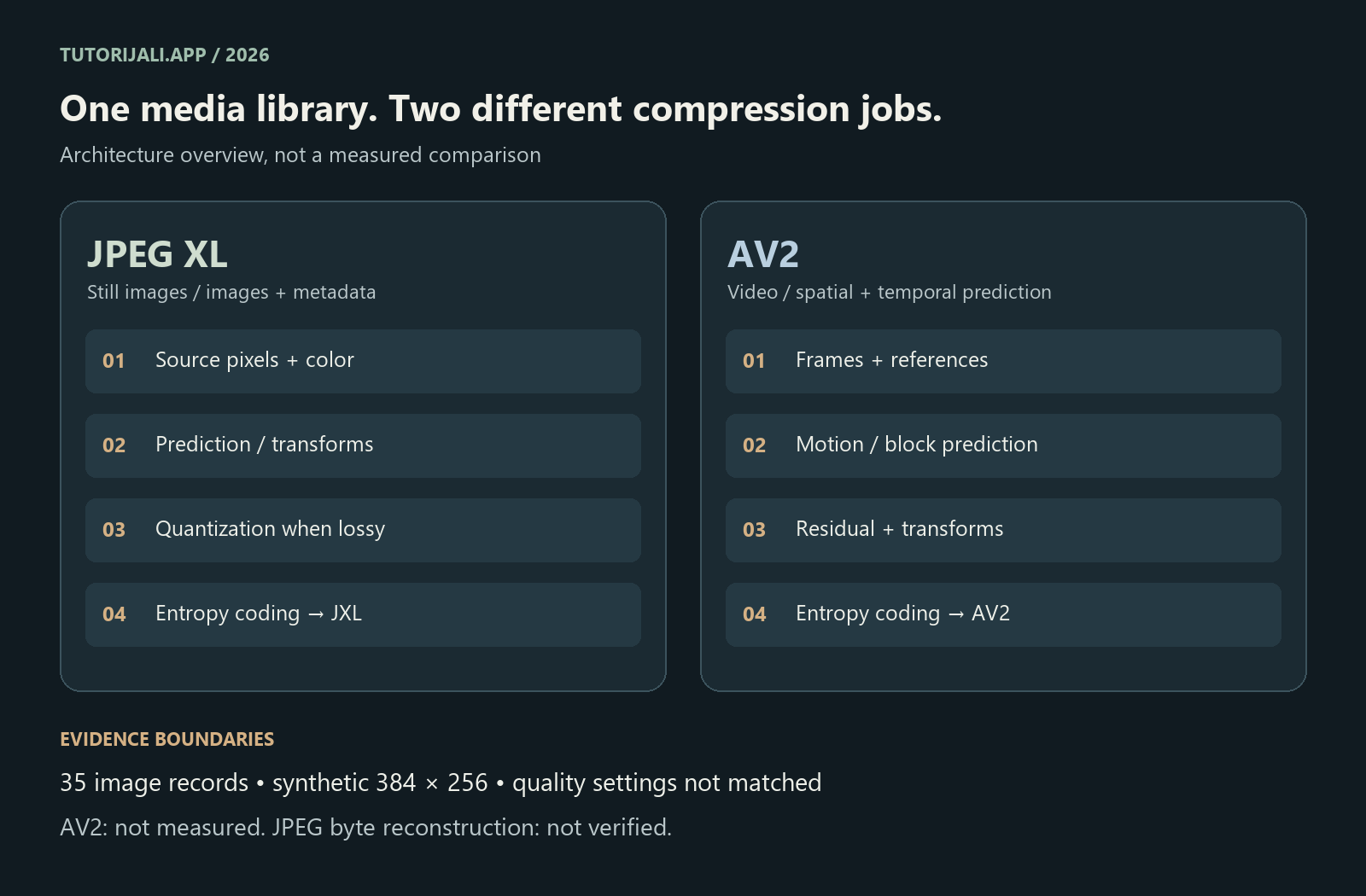
Code-rendered explanatory diagram. The blocks describe workflows; they are not a measured speed or size comparison.
VarDCT and Modular
VarDCT is a transform-based route suited to photographic material. Variable transform structure and perceptual decisions help represent detail economically. Modular coding uses prediction, transforms and entropy coding in a different structure that is important for exact image representation and some types of synthetic content.
“Modular equals lossless, VarDCT equals lossy” is an oversimplification. Modular tools can be used in more than one coding context. Content structure and encoder decisions influence the result.
The supplied synthetic geometry and UI examples are useful reminders: a lossless result can be smaller than a particular lossy result. That is not a contradiction. Different paths and settings incur different representation costs, especially on small artificial images.
Distance, color and HDR
In libjxl tooling, distance=0 requests lossless operation. Positive distance values control a perceptual distortion target; they are not percentages and are not comparable to another encoder's “quality 80” or “CRF 28.” A commonly used distance such as 1 is a useful starting point, not a promise that every viewer will find every image indistinguishable.
Color management is part of correctness. A wide-gamut source, its ICC profile, an HDR transfer function and a browser's display pipeline affect the final appearance. Converting everything into 8-bit SDR before measurement changes the question.
The attached experiment uses small 8-bit RGB synthetic sources. Its pixel checks do not establish HDR fidelity, alpha handling, ICC preservation or performance on camera photographs.
Progressive delivery and animation
Progressive coding can reveal a useful approximation before all bytes arrive. That can improve perceived loading, but the effect depends on how the image was encoded, browser support, network scheduling and page layout. It does not automatically improve Largest Contentful Paint.
Measure actual pages on representative connections and devices. Reserve the image's dimensions to avoid layout shifts. Compare the visible progression as well as final completion time. MDN currently notes differences in progressive support, including Safari. Browser capabilities.
Animation support also does not make JPEG XL a substitute for a full video delivery stack. Audio, seeking, adaptive streaming, long sequences and playback support introduce different requirements.
Exact reconstruction of an existing JPEG
Pixel equality and original-file equality are separate checks. A decoded image can match while file bytes differ because of metadata, coding choices or container structure. A successful JPEG reconstruction workflow should compare the complete files.
# Example for compatible libjxl tools; preserve the original.
cjxl original.jpg archive.jxl
djxl archive.jxl restored.jpg
sha256sum original.jpg restored.jpg
cmp original.jpg restored.jpg
Use the supplied reconstruction script and inspect its outcome. Do not disable JPEG reconstruction storage when the purpose is byte preservation. Record tool versions and verify each original rather than assuming success from the .jxl extension. libjxl documentation, cjxl options.
This operation was not run in the supplied experiment. Its environment lacked cjxl and djxl. This publication's RGB comparisons are not a replacement for this check.
Metadata and privacy
EXIF can contain camera details and location. XMP can contain editing history or rights information. ICC profiles describe color. Decide explicitly what must survive conversion and what should be removed from public delivery.
An archival master and a web derivative usually have different requirements. Preserve authorized originals and relevant rights information in the archive; inspect public exports for unintended personal data. Stripping every metadata block can also damage appearance if color information is lost.
Measure preservation with metadata inspection as well as visual and pixel checks. A lossless RGB round trip alone says nothing about EXIF or ICC.
Browser delivery with a fallback
JPEG XL now has important browser support, but older browsers, embedded webviews and other software still require a fallback. Feature detection and real target-device checks are more reliable than assuming every user has the latest release.
<picture>
  <source srcset="/media/landscape.jxl" type="image/jxl">
  <source srcset="/media/landscape.avif" type="image/avif">
  <source srcset="/media/landscape.webp" type="image/webp">
  <img src="/media/landscape.jpg" width="1600" height="900"
       alt="A lake beneath a forested mountain">
</picture>
This is an example, not an assertion that those demo files exist. Supply real derivatives and retain an appropriate fallback. If the server negotiates a single URL using Accept, configure cache keys and Vary: Accept correctly. Otherwise one client's variant can be served to an incompatible client. MDN Accept guide.
The interactive desk in this article uses already-decoded PNG previews. It works without a JXL decoder and therefore does not test your browser's native JXL support or decoding speed.
Practical JPEG XL commands
cjxl input.png output-lossless.jxl -d 0 -e 7
cjxl input.png output-d1.jxl -d 1 -e 7
cjxl input.png output-d2.jxl -d 2 -e 7
djxl output-lossless.jxl decoded.png

# Requires an FFmpeg build with libjxl enabled:
ffmpeg -hide_banner -i input.png -frames:v 1 \
  -c:v libjxl -distance 1 -effort 7 output.jxl
Distance controls the requested distortion target; effort changes the search and work budget. More effort can reduce size at additional encoding cost. A higher effort number is not a universal multiplier for quality or time. Effort documentation.
Check cjxl --version, djxl --version and your FFmpeg encoder list. The supplied results came from FFmpeg 7.1.5 with its available libraries, not a new run with libjxl 0.13.0. A current release note cannot retroactively establish the version used by an older experiment. FFmpeg codecs.
What AV2 1.0.0 defines
AV2's normative specification defines a bitstream and decoding process. It is the target against which implementations can be made interoperable. It does not require every encoder to make identical search decisions, and it does not install a decoder in existing televisions or phones. Normative specification.
AVM is reference software used in development and experiments. Optimized software decoders, production encoders, container integration and hardware are separate pieces of the ecosystem. A successful reference decode is an important step, not the whole delivery system.
AOMedia describes a royalty-free licensing model. That should not be rewritten as a blanket guarantee about every legal risk or every third-party implementation. Review the applicable terms for an actual distribution decision.
How temporal video compression works
A video encoder predicts a block from spatial neighbors or reference frames, calculates the residual, transforms and quantizes appropriate information, and entropy codes the necessary symbols. The decoder reconstructs the same prediction and residual process using the signaled information.
Reconstructed frames enter the reference loop. Encoder and decoder must agree on what future frames reference; using an unavailable original frame at the decoder would break that agreement.
I, P and B frame terminology is a useful introduction to intra and inter prediction, but it should not be treated as a complete description of AV2's frame and reference tools. Motion vectors, compound prediction, filtering, film grain treatment and reference management all influence efficiency and behavior.
Blocks, prediction and rate-distortion decisions
AV2 extends the toolset around partitioning, intra and inter prediction, motion models, transforms and filtering. Its overview describes 64, 128 and 256 superblock sizes, with 256 used for inter frames, and partitions down to 4 × 4. Do not generalize the largest size to every frame type. AV2 technical overview by a standards co-chair.
An encoder often evaluates a cost of the form J = D + lambda × R: distortion plus a weighted rate cost. The difficult engineering problem is searching useful candidates quickly enough for the intended application.
Intra block copy can reuse already reconstructed content, particularly relevant to screen-like patterns. Affine and other motion tools describe more than simple translation. Optical-flow-related refinement, temporal interpolation prediction and compound prediction increase the available choices. Their value depends on content, coding mode and implementation; a longer tool list is not itself a measured percentage improvement.
Bit depth, multiple streams and professional workflows
AV2's initial capabilities cover 8- and 10-bit signals and 4:2:0, 4:2:2 and 4:4:4 chroma arrangements as described by its specification and technical overview. Multiple-stream and multiview workflows are important design areas. Keep normative capabilities separate from the capabilities of a particular encoder build or player.
Professional 12-bit work is discussed as further profile development, not something to silently claim as part of every original deployment. Specification, technical overview.
HDR delivery needs correct transfer functions, color primaries, metadata and display behavior. A small SDR synthetic smoke clip cannot establish an HDR pipeline's correctness.
How to interpret “approximately 30%”
AOMedia's October update reports approximately 30% compression efficiency improvement over AV1 in its comparisons. That is a claim from the organization, with a benchmark context. It is not a result of this article's files and does not promise the same saving for every title, quality level or production encoder. AOMedia update.
As a hypothetical illustration, reducing a 6 Mb/s stream by 30% gives 4.2 Mb/s at the assumed equivalent quality. Real deployment savings also depend on adoption, encoding cost, representations retained for older devices and traffic patterns.
Never place the 30% figure beside the smoke-test sizes as if they came from the same comparison. The attached experiment contains no AV2 encode at all.
Building the AVM reference tools
The upstream repository provides build instructions and Common Test Conditions. Pin a release or commit, record the compiler and build configuration, and inspect the resulting tool's help before using options copied from a different revision. The v1.0.0 tag was found in the upstream repository during this publication's research; we did not build it here.
git clone https://github.com/AOMediaCodec/avm.git
cd avm
git checkout v1.0.0
cmake -S . -B build -DCMAKE_BUILD_TYPE=Release
cmake --build build --parallel
# Locate avmenc/avmdec in the resulting build and inspect --help.
An IVF output is useful in a laboratory. It is not a complete production packaging, streaming or playback strategy. Decode the output and verify frame count, dimensions, format and quality before measuring compression. AVM repository, CTC instructions.
Adoption is more than a finished specification
H.264 benefits from extensive deployment; HEVC and AV1 have their own established device and distribution profiles. AV2 begins with fewer deployed implementations. VVC occupies another standards and licensing ecosystem. The right choice depends on the actual audience and delivery stack.
Software decoding, hardware decoding, battery use and smooth playback are different concerns. A desktop demonstration does not establish sustained phone playback. A reference encoder's speed is not the final speed of every implementation of the standard.
Check decoder availability, container support, player support, operating system integration, CDN behavior and fallbacks. Measure failure rates and energy on representative devices before expanding a rollout.
Complementary technologies
JPEG XL can serve photographs, archival image workflows, graphics and progressive delivery. AV2 can serve video sequences where temporal relationships provide additional compression opportunities. A media platform might use both while retaining JPEG, WebP, AVIF, H.264 or AV1 derivatives for compatibility.
Choose the representation after defining the job. Original-file preservation, fast web delivery, HDR photography, live conferencing and film distribution have different success criteria. There is no meaningful single size ranking across all of them.
Design the comparison before running it
Separate three questions: does the pipeline work, how efficiently does it compress at comparable quality, and is it operationally suitable? The supplied smoke experiment answers part of the first question.
For a useful compression benchmark, freeze source files and hashes, encoder versions, bit depth, chroma, color conversion, threading and hardware. Use several quality points per encoder. Decode every output and align the measured signal. Publish failures instead of silently dropping them.
Report per-image or per-clip results and distributions, not only one aggregate. Averages can conceal content classes where the behavior is very different. Add visual inspection, especially around text, edges, texture, gradients, grain and motion.
Build a representative image corpus
Use licensed camera photographs, screenshots, graphics, difficult gradients, noisy low-light scenes and relevant HDR sources. Record provenance, permission and transformations. Keep a separate alpha-preservation task rather than silently flattening transparent sources to RGB.
The supplied corpus contains six deterministic synthetic 384 × 256 images. Five RGB scenes are in the 35-record image experiment. The sixth is RGBA and is excluded from that comparison. This is useful for inspecting artifacts and pipeline behavior, but it cannot represent all smartphone photographs or professional image archives.
Original input sizes also matter. A small generator-produced PNG can be much smaller than an FFmpeg-reencoded PNG containing identical pixels. Report both rather than treating one encoder's PNG as the only possible lossless baseline.
Control the video signal
A video corpus should include motion, cuts, camera noise, animation, screen content and different spatial detail. Freeze duration, dimensions, frame rate, frame alignment, bit depth, chroma and color conversion. Keep audio out of a video-only codec comparison or report its contribution separately.
GOP structure, random-access requirements, reference frames and latency constraints affect results. An offline long-GOP encode and a low-latency conferencing encode solve different problems. Equal CRF values across different encoders do not equalize quality.
The supplied video signal is only 1.5 seconds: 36 frames of testsrc2 at 24 fps and 320 × 180. Headers and container overhead can be substantial at this scale. It is a pipeline smoke example, not representative streaming content.
What the metrics tell you
| Metric | Useful information | Limit |
|---|---|---|
| PSNR | Pixel error relative to a specified signal | Not a complete perceptual judgment |
| SSIM | Structural similarity | Still depends on implementation and signal handling |
| SSIMULACRA2 | Perceptual image comparison | Use the documented implementation and suitable inputs |
| Butteraugli | Perceptual image difference | Not interchangeable with every quality control |
| VMAF | Video quality model | Model, preprocessing and content domain matter |
For 8-bit pixels, PSNR = 10 × log10(255² / MSE). When MSE is zero, PSNR is mathematically infinite. The supplied CSV stores 99.99 as a sentinel for this case; it is not a measured finite ceiling. Our desk shows an exact-RGB label when the publication inspection confirms equality.
SSIMULACRA2, Butteraugli and VMAF were not computed in this supplied experiment. Do not invent their values from PSNR or file size. SSIMULACRA2, VMAF.
Compare quality curves with BD-rate
Bjøntegaard Delta Rate compares rate-quality curves over an overlapping quality interval. It is a useful way to summarize relative bitrate at comparable measured quality when enough suitable points exist.
Encode several quality levels for each codec, measure aligned outputs, choose and disclose interpolation, and use only the common quality range. If one curve spans VMAF 50-90 and another 75-99, their useful overlap is 75-90. Extrapolation beyond supported data can produce misleading savings.
BD-rate is not the only legitimate comparison and not a universal judge. Results depend on the metric, range, source set and encoder settings. A saving accompanied by an unacceptable encode time or unavailable decoder may not help the intended deployment. This guide reports no measured BD-rate.
Inspect the supplied image experiment
The supplied research records FFmpeg 7.1.5 encoding and decoding five RGB scenes with seven configurations: JXL distances 0, 1 and 2; JPEG -q:v 3; WebP quality 80; AVIF CRF 28; and PNG. All 35 CSV records have an ok status. These are the original research records, not newly run encoders on this website's server.
Signal mismatch: the JXL path uses rgb24, while JPEG, WebP and AVIF use 4:2:0 conversion in the supplied script. Quality settings are also unmatched. This prevents a fair codec-efficiency ranking.
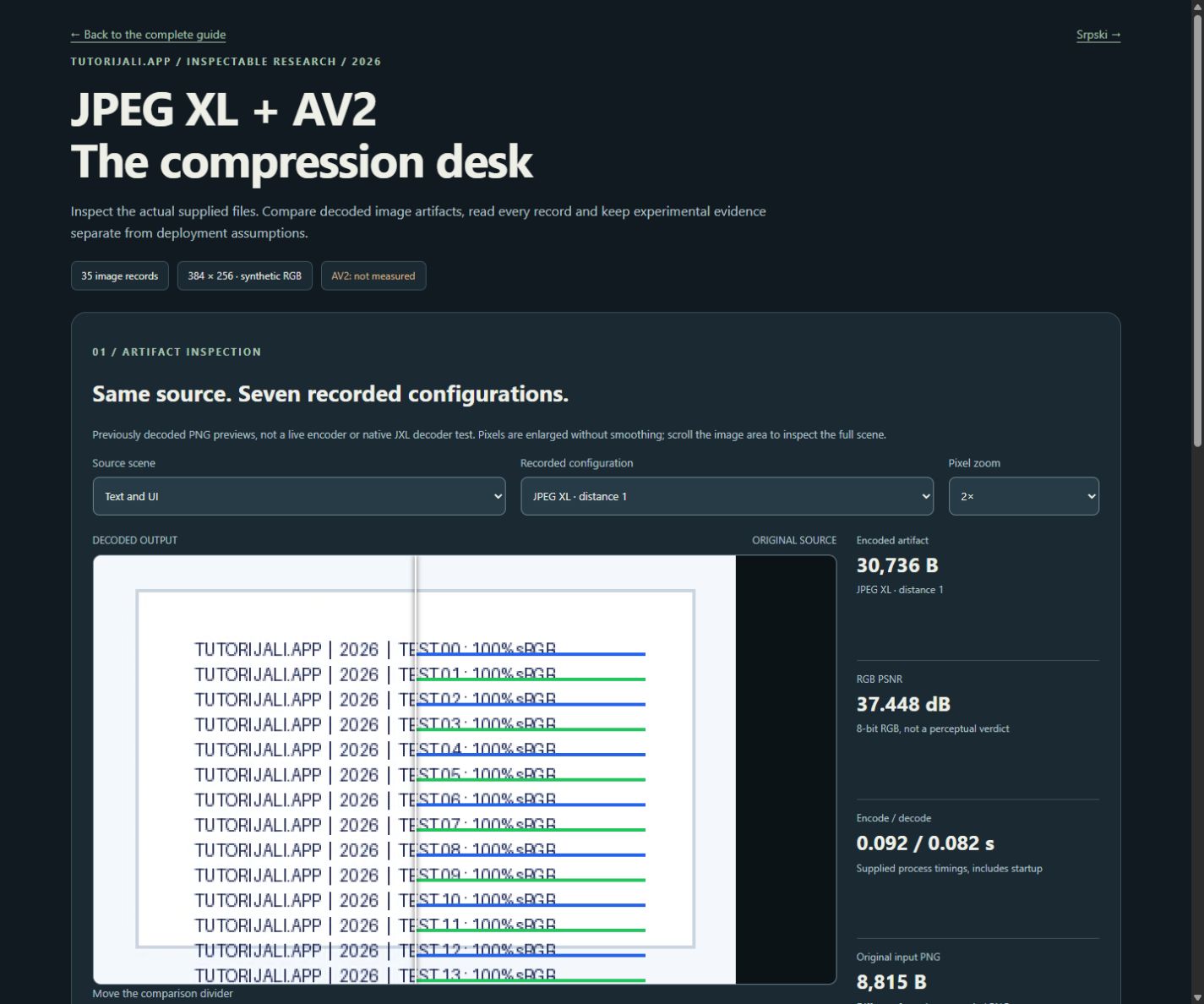
Compare every scene and preset interactively. Move the divider, inspect enlarged decoded pixels, download the encoded artifacts and see the exact CSV values. The previews are decoded PNGs; no encoder runs in your browser.
| Scene | Configuration | Encoded bytes | RGB PSNR |
|---|---|---|---|
| Gradient | JXL distance 1 | 1,836 | 51.399 dB |
| Gradient | JPEG qscale 3 | 3,411 | 46.238 dB |
| Gradient | WebP quality 80 | 1,178 | 41.342 dB |
| Gradient | AVIF CRF 28 | 620 | 44.558 dB |
| UI and text | JXL distance 0 | 9,898 | Exact RGB pixels |
| UI and text | JXL distance 1 | 30,736 | 37.448 dB |
| UI and text | FFmpeg PNG | 6,255 | Exact RGB pixels |
| Geometry | JXL distance 0 | 8,391 | Exact RGB pixels |
| Noise | JXL distance 0 | 322,180 | Exact RGB pixels |
| Texture | JXL distance 1 | 8,378 | 41.130 dB |
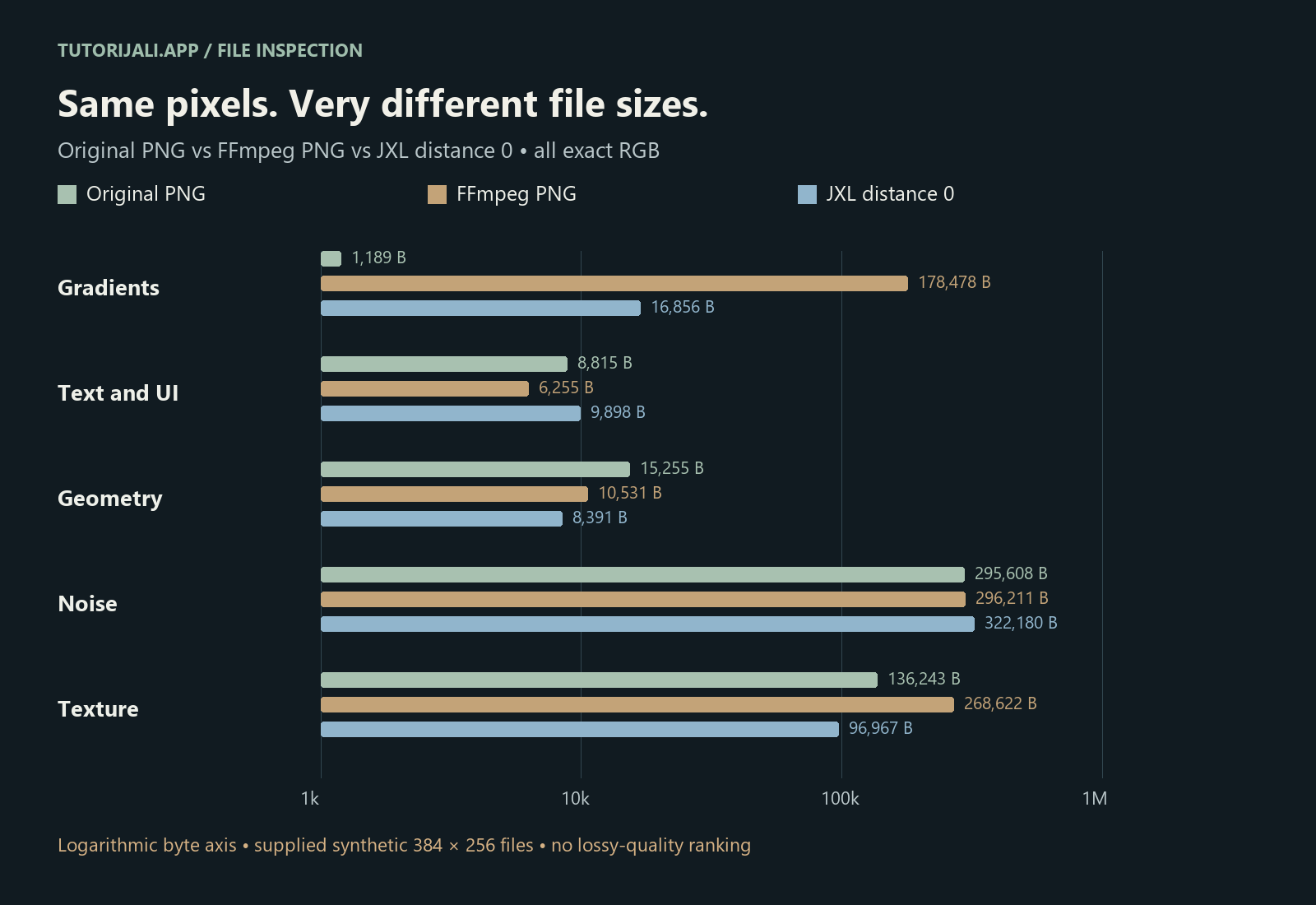
Actual existing file sizes on a logarithmic byte axis. All three paths preserve the same RGB pixels. This does not rank lossy quality.
A baseline trap worth noticing: the original gradient PNG is 1,189 bytes, while the supplied FFmpeg-reencoded PNG is 178,478 bytes. Their decoded RGB pixels match exactly. The JXL distance-0 output is 16,856 bytes. It is smaller than that FFmpeg PNG and larger than the original PNG. A selective baseline could tell two opposite stories about the same files.
For publication, we read the supplied originals and decoded outputs and found exact RGB equality for all five JXL distance-0 outputs and all five reencoded PNG outputs. This verifies those existing decoded artifacts only. It does not verify metadata, HDR, encoder version internals or JPEG byte reconstruction. Publication inspection.
The small gradient AVIF file has a different PSNR from the JXL distance-1 file. The UI lossy JXL file is larger than its lossless counterpart. Noise is difficult to compress losslessly. Each observation is informative about these particular inputs and settings; none establishes a universal winner.
The supplied video smoke experiment
| Codec | Container bytes | Supplied settings |
|---|---|---|
| H.264 | 26,874 | x264 medium, CRF 28 |
| HEVC | 34,130 | x265 medium, CRF 28 |
| AV1 | 33,415 | libaom-av1 cpu-used 6, CRF 28 |
| AV2 | Not measured | AVM_NOT_INSTALLED |
These are sizes of very short test containers, not matched-quality bitrate results. Equal CRF labels do not equalize quality between encoders. Container overhead, keyframes and initialization can dominate a 36-frame example.
The scripts demonstrate a preparation and encoding path for available tools and preserve raw output records. AV2, VMAF and a full CTC rate-quality comparison remain unmeasured. A missing implementation should produce a missing-result label, not an estimated bar in a chart.
Reproduce and extend the laboratory
Download the original package and inspect the scripts before executing them. Use a suitable local Linux or WSL environment with Python, Pillow, NumPy and the required FFmpeg encoders. These commands are instructions for a future run, not a statement that we ran them during publication.
python3 -m pip install pillow numpy

# Dimensions of the supplied image corpus:
python3 scripts/generate_corpus.py \
  --out corpus/images --width 384 --height 256 --seed 20261119

python3 scripts/benchmark_images.py \
  --input corpus/images --out results/image_smoke

# Requires compatible cjxl/djxl and an authorized source JPEG:
bash scripts/reconstruct_jpeg.sh /path/to/original.jpg

# A new, larger smoke run, not the supplied 320x180 / 36-frame run:
OUT=results/video_extension W=640 H=360 FRAMES=120 \
  bash scripts/benchmark_video.sh
Record the actual library versions and hashes rather than expecting every future version to reproduce identical encoded bytes. A 1024 × 768 corpus is a useful extension but is not the source of the 384 × 256 results published here.
Add AVM to PATH only after building and inspecting it. Start with a tiny clip before committing to a large reference encode. For a real comparison, use CTC configurations, decode AV2 to a controlled signal, align frames and collect several quality points.
Publish inputs where licensing allows, commands, versions, failures and per-source records. Keep the original research ZIP separate from the publication inspection so readers can see which evidence came from which step.
Time, memory and energy
The supplied image timings include process launch, library loading and filesystem work. On a 384 × 256 image those costs can dominate. A single 80-millisecond process measurement is not a clean measure of codec throughput.
/usr/bin/time -v \
  ffmpeg -hide_banner -i input.png -frames:v 1 \
  -c:v libjxl -distance 1 -effort 7 output.jxl
Record elapsed time, user and system CPU time, peak resident memory, thread count and hardware. Repeat runs and report variability. Separate cold starts from warm operation and single-image latency from sustained throughput.
Energy requires an actual measurement method, such as appropriate platform counters or a whole-system meter. Time alone is not energy. CPU, GPU, memory, display and storage contribute differently. This guide contains no measured energy comparison.
Practical deployment choices
A website: add JXL derivatives with fallbacks, preserve source assets, stage a rollout, and measure actual load behavior and failed displays. Optimize responsive dimensions before assuming a new codec solves oversized images.
A photographer: separate RAW masters, edited masters, delivery files and archival reconstruction. Preserve color and metadata intentionally. Verify restoration before changing retention policy.
A family archive: keep backups and a readable catalog. A smaller archive without a reliable decoder or restore path is a fragile archive. A conversion is not a backup.
A streaming service: assess AV2 through encoder quality curves, device support, software and hardware decode, energy, packaging and fallback cost. Encoding one representation does not remove the need for all existing variants.
A live application: prioritize latency, stability and constrained devices. An excellent offline result may be irrelevant if encoding cannot keep up or decoding drains the battery.
Operational and security considerations
Media decoders process complex untrusted inputs. Keep libraries maintained and patched, enforce resource limits, and isolate processing where appropriate. Huge dimensions, excessive memory demands or malformed files can be operational problems even when the file is small.
The libjxl 0.13.0 release includes security and reconstruction-related fixes. Treat version management as part of the workflow. A browser's Rust decoder and a separate server-side native encoder can have different update paths. libjxl release notes.
Consider metadata policy, rights, licensing, retention, backup restoration and dependency availability. Keep original files until the new path has been verified for its actual purpose. Open standards help interoperability, but they do not eliminate implementation maintenance.
Calculate savings without pretending to measure them
For decimal storage units, the simple model is saved TB = baseline TB × eligible share × assumed saving. Effective saving across the whole baseline is eligible share × assumed saving.
| Hypothetical case | Calculation | Result |
|---|---|---|
| 10 TB, all eligible, assumed 20% saving | 10 × 1 × 0.20 | 2 TB |
| 1 PB = 1,000 TB, 20% eligible, assumed 25% saving | 1,000 × 0.20 × 0.25 | 50 TB, or 5% overall |
| 100 photos/day at 5 MB each | 100 × 5 × 365 | 182.5 GB/year |
| Same annual photos, assumed 35% saving | 182.5 × 0.35 | About 63.9 GB/year |
These are arithmetic scenarios, not measured compression results. The interactive desk includes an editable calculator with the assumptions visible. It excludes extra variants, redundancy, billing rules, encoder cost and migration labor. Use a fuller cost model for an actual purchase or rollout decision.
Common misunderstandings
- “The smallest file wins.” Only after quality, signal, features and operational constraints are comparable.
- “CRF 28 means the same quality everywhere.” Encoder controls use different scales and models.
- “JXL distance 1 is always visually lossless.” It is a target, not a universal perceptual guarantee.
- “Lossless pixels mean the original file is preserved.” Metadata and bytes need separate checks.
- “AV2 is already available in every browser.” Specification and deployment are separate.
- “A 30% claim guarantees a 30% lower bill.” Adoption, fallback and billing affect the outcome.
- “AVIF is AV2 for images.” AVIF uses AV1 technology.
- “A PSNR of 99.99 is a measured maximum.” Here it is a sentinel for zero RGB error.
- “Synthetic scenes represent all photographs.” They cover selected structures only.
- “The PNG baseline is uniquely defined.” Different encoders can produce very different sizes from identical pixels.
- “Reference encoder time is the standard's final speed.” Implementations and optimization differ.
- “Progressive coding automatically improves LCP.” Measure the actual page and browser behavior.
- “Converting the archive creates a backup.” Independent copies and a restore procedure are still needed.
What should happen next?
JPEG XL's browser support makes controlled image delivery and archival evaluation worth exploring. AV2's finalized decoding specification makes implementation and evaluation concrete, while broad deployment remains a separate engineering process.
The strongest next experiment would use licensed real photographs and video clips, several quality points, controlled signal formats, current pinned encoders, decoded outputs and perceptual metrics. It would publish per-content curves, BD-rate where appropriate, time, memory and measured device energy.
Until that exists, the supplied experiment is best used as an inspectable teaching laboratory. It demonstrates actual files and actual limits. AV2 is not measured, JPEG byte reconstruction is not verified, and no universal codec winner is declared.
Primary sources and downloadable evidence
Standards and implementation documentation
- JPEG XL standard overview
- JPEG XL format overview
- libjxl project
- cjxl manual
- Encoding effort
- libjxl 0.13.0
- AV2 1.0.0 normative specification
- AVM reference software
- Common Test Conditions
- AV2 technical overview
- AOMedia specifications
Browser support and announcements
- Chrome: shipping JPEG XL
- Mozilla: intent to ship JPEG XL
- Firefox 158 release notes
- MDN image format guide
- AOMedia AV2 release
- AOMedia October ecosystem update
Metrics, tools and research files
- SSIMULACRA2
- Netflix VMAF
- FFmpeg codecs and filters
- MDN content negotiation
- Interactive compression desk
- Original research ZIP, unchanged
- All 35 image records, CSV
- Original image methodology, JSON
- Publication inspection, JSON
- Publication sources and article files, ZIP
The original package preserves the supplied research, scripts and records. The publication inspection separately records file hashes, sizes and comparisons of existing decoded RGB artifacts. The hero is an AI-generated editorial illustration; the architecture diagram is code-rendered; the desk screenshots show the actual local viewer and supplied synthetic data.
ChatGPT and Claude: 60 practical workflows, useful prompts and verifiable results
A complete working library for servers, apps, data, documents, content, media and automation, with copyable prompts and clear completion checks.
Email API services in 2026: prices, free plans and the limits that matter
Prices and real quota distinctions for 20 transactional email services. Explore modeled costs, burst capacity, implementation examples and a reliable sending workflow.
Self-hosted email in 2026: control, costs and a real outage experiment
Does your email keep working when the primary server fails? Domains, software, networking, costs and recovery, with real Postfix/Dovecot trials, raw observations and a separate 24-hour model.

[Udemy] Succeed in the Age of AI with Dr. Angela Yu
Build practical AI workflows, write better code, and create an AI-augmented learning system in Dr. Angela Yu's course.
How to Save on Digital Subscriptions: Family Plans, Marketplaces, and Account Security
Compare official software deals, eligible family plans, subscription-sharing services, and digital marketplaces while protecting your accounts and personal data.
Complete Audio Guide 2026: 1,000+ Services for Music, Streaming, Radio, Podcasts, and Production
A complete guide and catalog of more than 1,000 audio services, web tools, and programs for music, radio, podcasts, audio editing, DAW production, sample libraries, metadata, and lyrics.
Share your thoughts, questions, or tips about this article.