Prices and real quota distinctions for 20 transactional email services. Explore modeled costs, burst capacity, implementation examples and a reliable sending workflow.
A service advertising 12,000 free emails a month may accept only 50 per hour. An inexpensive transport can begin in a sandbox restricted to verified recipients. For login codes, registration confirmations, invoices and alerts, the monthly bill and capacity during the busiest five minutes are separate calculations.
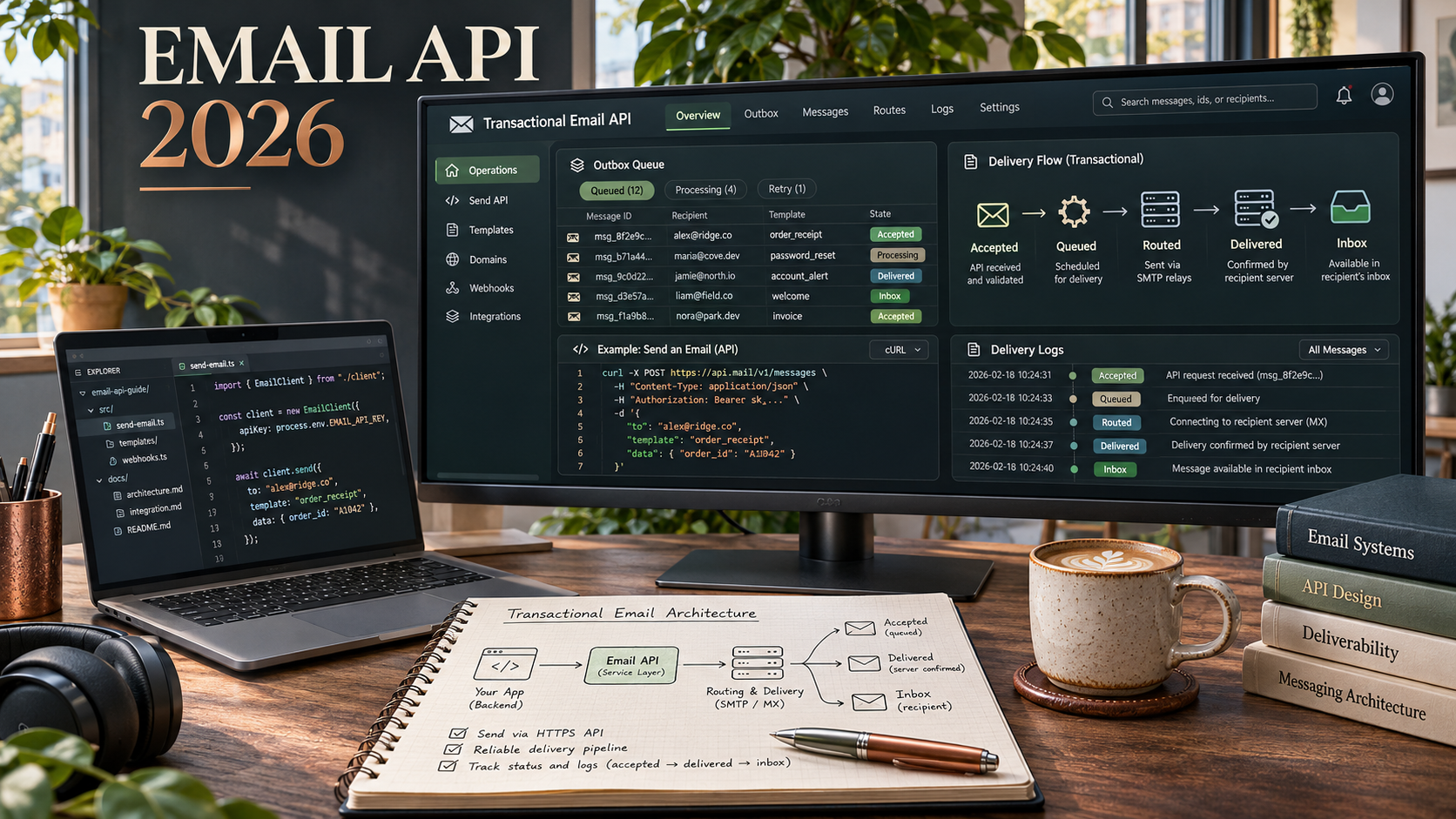
AI-generated editorial illustration. The dashboard is explanatory artwork, not a capture of a provider account or a delivery benchmark.
Public documentation reviewed November 23, 2026. This guide covers 20 services, with a reproducible cost model and an interactive planning desk. Prices are a dated snapshot, not a purchase quote. The comparison does not rank inbox placement or claim that a live sending experiment was performed.
Open the pricing and capacity desk · Download the original package · Publication data and sources
Evidence boundaries. Entries link to public provider documentation. Mail Gazelle's primary pricing page was independently reviewed in the browser after the search tool could not retrieve it. Its Pro attachment rate conflicts between the plan card and feature table, so attachment costs require confirmation. The planner uses published limits and arithmetic assumptions; it does not contact providers or measure delivery.
Compare 20 services at a glance
Monthly USD pricing before tax is used unless another currency or billing model is stated. Annual-equivalent prices are not monthly invoices. A free allowance, a time-limited trial, a purchased credit and an allowance inside an existing subscription are different offers. Account approval, regional quotas and anti-abuse controls can further restrict a new sender.
| Service | Free / trial | Selected paid plan | Important limit | Sources |
|---|---|---|---|---|
| SendPulse | 12,000/month; 400/day; 50/hour; 2 domains | $15/10k or $49/50k PAYG | Credits valid 12 months; selected PAYG throughput 4,000/hour or 6,000/hour. | Pricing · Details |
| Brevo | 300/day; up to 9,000 over 30 days | Starter from $9/month for 5,000 | Marketing and transactional sends share the free daily quota. Excess transactional sends may queue. | Pricing · Details |
| Mailjet | 6,000/month; 200/day | Starter $9/8k; Essential $19/15k | Monthly invoices, not annual equivalents. Paid plan removes the listed daily cap. | Pricing |
| Mailtrap | 4,000/month; 150/day; 1 domain | Basic $15/10k; 5 domains | Sandbox and live sending are separate products. Confirm current initial hourly quota. | Pricing · Details |
| Mail Gazelle | 3,000/month; 200/day; unlimited domains subject to fair use | $10/10k; $20/50k; paid plans without daily cap | Primary pricing reviewed in browser. Pro attachment rate conflicts: card $1.50/GB, table $2/GB. | Pricing |
| Resend | 3,000/month; 100/day; 3 domains | Pro $20/50k; 10 domains | Default API 10 requests/second per team. Paid plan has no daily email quota. | Pricing · Details |
| MailerSend | 500/month; 1 domain; 100 API requests/day | Hobby $7/5k monthly; 1,000 API requests/day | Requests and monthly sent emails are separate units. Check SMTP/shared rules. | Pricing · Details |
| Postmark | 100/month developer allowance | Basic $15/10k; 5 domains | No daily email cap; $1.80 per extra 1,000; 45-day retention on listed Basic plan. | Pricing |
| Zoho CPaaS | First 10k credit; trial terms apply | $2.50 per 10k credit; 6-month paid validity | Consumed credit value differs from minimum cash purchase; charged per recipient. | Pricing · Details |
| Amazon SES | Eligible AWS credits; account-specific terms | $0.10/1k à la carte; $0.16/1k first Essentials tier | Sandbox: 200/rolling 24h and 1/second. Production quotas and plans are regional. | Pricing · Details |
| mailkube | 4,000/month; 140/day; 4/second; unlimited domains | Monthly: $7/10k; $13/50k; $27/100k | Momentum 5,000/day and 6/second; Elite 8/second; sending pauses at monthly cap. | Pricing · Details |
| SMTP2GO | 1,000/month; 200/day; unverified-domain hourly cap | USD card: $10/10k; confirm checkout | Page heading differs from the USD card. Verify current quote and sender setup. | Pricing · Details |
| Mailgun | 100/day; 1 custom sending domain | Basic $15/10k; Foundation $35/50k; Scale $90/100k | Paid plan and overage features differ; endpoint and domain region must match. | Pricing · Details |
| Twilio SendGrid | 100/day for 60 days | Essentials from $19.95/month | Time-limited trial, not a permanently recurring free tier. | Pricing · Details |
| Elastic Email | Up to 3,000/month; verification/daily conditions | Email API Starter $19/50k; Pro $49/50k | API and Marketing have separate pricing. Inspect new-account restrictions. | Pricing · Details |
| Bird | 1,000/month; 50/day; 1 domain | Startup $15 monthly deposit; $0.40/1k usage | Corrected Send API tiers: Free 10/min, Startup 30/min, Growth 100/min. | Pricing · Details |
| Plunk Cloud | 1,000/month; inbound also consumes allowance | Cloud PAYG $0.001/email | Attachment-bearing messages can use extra units; self-hosted transport has separate costs. | Pricing · Details |
| Scaleway TEM | Essential: 300/month per organization | Essential €0.25/extra 1k; Scale €80/100k | EUR pricing; account approval and sending quotas apply. No implicit USD conversion. | Pricing · Details |
| Mailchimp Transactional (Mandrill) | Up to 500 trial sends to verified domain | $20 per 25k block in first band plus eligible subscription | Mailchimp Standard/Premium base subscription is an additional prerequisite cost. | Pricing |
| Cloudflare Email Service | Free sends to verified destinations | Workers Paid from $5; 3k included; $0.35/extra 1k | Arbitrary recipients require paid plan. Daily quota is account-specific; sending docs labeled Beta. | Pricing · Details · Details |
Monthly capacity alone misses burst limits. Check whether a limit counts recipients, messages, requests, connections or credits. A batch endpoint can reduce request count without removing a recipient quota. “No daily limit” on a plan does not mean unlimited API throughput.
What changes the decision for each provider?
SendPulse: a large free allowance with an hourly constraint
The free SMTP allowance is 12,000 a month, with 400 a day and 50 per hour. Using the full amount over 30 days requires sending 400 every day across at least eight hourly intervals. A 28-day period permits at most 11,200 under that daily constraint.
The supplied model uses PAYG blocks rather than pretending that every volume is a flat subscription. Published PAYG throughput includes 4,000/hour for the 10,000 block and 6,000/hour for the 50,000 block. Oversized messages can consume additional units: inspect the documented size thresholds before pricing PDF invoices. Pricing, sending and size limits.
Brevo: shared daily allowance and a queue
Free includes 300 daily sends shared by marketing and transactional messages. Sending 100 promotions and 200 transactional messages exhausts that day's allowance. A queued login code can arrive after its useful lifetime.
Starter begins at $9 for 5,000 monthly sends without the free plan's daily limit. Brevo also offers prepaid credits; confirm the price in the account before adding a block to a comparison. Its help center documents the handling of excess transactional messages and the distinction between free and paid limits. Plan details, free-plan limits.
Mailjet: separate annual-equivalent and monthly prices
Free includes 6,000 monthly and 200 daily messages. Starter provides 8,000 without that daily limit. The September 2026 pricing notice explicitly lists $9 monthly for Starter, $19 for Essential 15k, $40 for Essential 50k and $112 for Premium 100k. Annual billing shows discounted monthly equivalents and commits the annual payment.
The comparison uses monthly invoices. Sender identities and domain verification can also depend on the API key, so check how the account's domain and sender limits apply to multiple applications. Pricing, official September update.
Mailtrap: sandbox and live delivery are separate products
Email Sandbox captures development messages. Email Live Sending delivers production mail. Its free live plan lists 4,000 monthly messages, 150/day, one domain and three days of logs. Basic starts at $15 monthly for 10,000 with five domains and five days of logs.
The supplied research records a separate initial hourly sending limit. Confirm the account's current throughput rather than inferring it from a paid monthly volume. Keep development and live credentials separate. If invoice support commonly happens after two weeks, retain an appropriate minimal audit record in your own system. Live pricing, sending-limit documentation.
Mail Gazelle: published plans, retention and a pricing discrepancy
The primary pricing page lists Solo at 3,000/month with a 200/day cap, Pro at $10 for 10,000 and Scale at $20 for 50,000. Paid plans have no listed daily cap. Domains are unlimited subject to fair use; the page also advertises unlimited API keys. Team sizes are one on Solo, up to five on Pro and unlimited subject to fair use on Scale.
Attachment allowances are 1, 5 and 20 GB/month. Each email permits up to ten attachments and 7 MB. Message-log retention is 30, 90 and 365 days. Extra email rates are $1.50/1,000 on Pro and $1/1,000 on Scale, billed per extra email at month end. The FAQ says paid sending continues with overages; Solo stops at its limit.
A concrete discrepancy needs confirmation: the Pro card lists $1.50 per additional GB of attachments, while the comparison table lists $2/GB. Scale lists $1/GB. This guide does not choose one conflicting Pro price. At 12 GB total attachments with at most 10,000 emails, Pro would be $20.50 using the card rate or $24 using the table rate, while Scale is $20 if the usage fits its included allowance.
For messages alone, Pro at 20,000 is $25; Scale is $20. At 100,000, Scale gives $20 + 50 × $1 = $70 under the published overage rule. Throughput, checkout activation and actual delivery were not tested. Primary pricing.
Resend: email quotas and API requests are different limits
Free includes 3,000 monthly messages, 100 per UTC calendar day and three domains. Pro is $20 for 50,000, with ten domains and no daily email quota. At the published $0.90 per additional 1,000, an eligible Pro overage configuration at 100,000 gives $65. The separate Scale plan is $90 and has a different feature set.
The default API limit is 10 requests/second per team across API keys. Batch sending has its own endpoint rules and does not make recipient quotas disappear. A sending region also does not establish where every category of data is stored. Pricing, usage limits, data-processing information.
MailerSend: daily request budgets need their own calculation
Free lists 500 monthly emails and 100 daily API requests. Hobby lists 5,000 emails, one sending domain and 1,000 daily API requests. The research uses $7 monthly; the $5.60 equivalent represents $67.20 paid annually.
A request budget is not the same thing as the number of recipients sent a message. Inspect the API and SMTP rules, overage limits and response headers. A short activity-history window also affects support operations. Pricing, API rules.
Postmark: operational visibility and separated message streams
The free developer allowance is 100 monthly messages. Basic at $15 for 10,000 lists five sending domains, 45-day data retention and no daily email limit. Its extra-message rate is $1.80 per 1,000. The $16.50 Pro configuration offers a different domain and feature allocation.
Transactional and broadcast Message Streams help keep traffic categories and operational analysis distinct. Retention and stream separation are useful product features; they do not establish a measured inbox-speed advantage in your application. Postmark pricing.
Zoho CPaaS: consumed credit value versus the cash purchase
Zoho's email credit covers 10,000 recipients for $2.50 and remains valid for six months. The first credit is a trial offer with its own terms. The documentation also uses the ZeptoMail product name, so verify the account, data center and endpoint used by an existing integration.
At 1,000 messages the proportional consumed value is $0.25, but buying a credit still requires $2.50. If unused credit expires, the effective cost per message rises. The model therefore labels consumed value rather than presenting it as a $0.25 checkout. Pricing, credit terms.
Amazon SES: low transport cost with regional onboarding
The pricing page lists $0.10 per 1,000 for à la carte and $0.16 for the first Essentials tier. It states that qualifying new or inactive account-region combinations start on Essentials from July 21, 2026, with the option to switch. Verify the actual plan in the sending region.
Those figures are the sending base. Outgoing data, attachments, optional services and other AWS resources can add cost. New-user AWS credits have their own terms; do not assume the previous SES-specific free allowance applies to every new account.
Sandbox restrictions are independent of price: 200 recipients in a rolling 24-hour window, a maximum of 1/second, and recipient restrictions except for approved simulator use. Production access and quotas are regional. SES pricing, quotas, production access.
mailkube: domain count does not multiply throughput
The monthly research configurations are Launch $7/10k, Momentum $13/50k, Elite $27/100k and Enterprise $489/1M. The pricing page's annual equivalents differ: Launch $72/year and Momentum $132/year, for example. Monthly values are also shown on the provider's own comparison page.
Free lists 140 daily messages and 4/second. Momentum lists 5,000/day and 6/second; Elite removes the daily cap but lists 8/second. Unlimited domains do not create an independent organization quota for every domain. Sending pauses at the monthly cap according to the FAQ.
Review signed webhooks, idempotency, scheduled-message handling and the DPA. Retention ranges by plan; a sending location, message-body processing and support access deserve separate questions. Pricing and throughput, monthly configurations, DPA.
SMTP2GO: useful for existing SMTP integrations
Free lists 1,000 monthly messages and 200/day, with an additional hourly restriction for unverified domains. The public USD pricing card shows Starter at $10 for 10,000 with $1 per additional 1,000, while the page title advertises a different starting figure. Confirm the account quote.
For WordPress, ERP or a legacy application, SMTP may minimize integration changes. Still inspect TLS, credential rotation, verified senders, logs and the number of systems sharing the same credentials. Pricing, free plan.
Mailgun: plan capabilities matter alongside volume
Free lists 100 daily messages and one custom sending domain. Basic begins at $15 for 10,000; Foundation at $35 for 50,000 and Scale at $90 for 100,000 are separate feature configurations. Retention, domains, validation and overages differ.
Check the exact plan's overage rate and any address-validation charges. Match the US/EU endpoint to the domain configuration and the application's actual processing requirements. Pricing, overage rules.
Twilio SendGrid: the trial has an end date
The current new-account offer is a 60-day trial with 100/day, followed by paid pricing such as Essentials from $19.95. It should not be described as an indefinitely recurring free plan.
Before migration, inventory dynamic templates, Event Webhook processing, suppression data and subusers. Changing credentials alone does not migrate those dependencies. Email API pricing, trial terms.
Elastic Email: use the API pricing page
Email API Starter lists $19 for up to 50,000, while API Pro lists $49 at that volume. The free offer lists up to 3,000 monthly messages with new-account verification and daily-limit conditions documented separately.
Marketing and API products have distinct pricing. Check the chosen plan's webhooks, logs, deletion controls and burst behavior before choosing on the headline price. API pricing, new-account limits.
Bird: deposits, usage and request rates
Startup adds a $15 monthly deposit to the shared balance and lists $0.40 per 1,000 emails. That is roughly 37,500 messages of consumption if the balance is used only at that rate. Sending 30,000 consumes $12 of value but does not turn the monthly deposit into $12.
Publication correction: the current detailed table lists Send API limits of 10/minute for Free, 30/minute for Startup and 100/minute for Growth. The supplied article assigned the first rates to the wrong tiers. SMTP connections and batch limits are different measures. Bird pricing, billing model.
Plunk: hosted consumption and self-hosted operations
Cloud Free includes 1,000 monthly messages; paid usage is $0.001 per email. The billing documentation describes which outbound, inbound, workflow and attachment events consume units. In the supplied example, 10,000 messages with 2,000 attachment-bearing messages consume 12,000 units, or $12 at that rate.
Self-hosting removes the hosted panel fee, not infrastructure and transport costs. Budget for the server, database, backups, maintenance and SES transport where used. Pricing, billing, SES integration.
Scaleway TEM: keep EUR and quota approval visible
Essential includes 300 monthly messages per organization and charges €0.25 per additional 1,000. Scale is €80 for 100,000, then €0.20 per additional 1,000, with a dedicated IP in the listed package.
Approval and account rules affect sending capacity. Do not merge the EUR figures into a USD ranking without an explicit exchange-rate date and common tax treatment. Pricing, capabilities and limits.
Mailchimp Transactional: the add-on is not the whole bill
Mandrill is offered as Mailchimp Transactional. The first pricing band is $20 per block of 25,000, subject to the qualifying Mailchimp subscription. At 50,000, two blocks cost $40 plus that subscription.
The trial permits limited sends to a verified domain. An organization already paying for the required platform can compare the incremental module cost; a new buyer must compare the combined bill. Transactional pricing.
Cloudflare Email Service: distinguish existing and new Workers cost
Workers Paid begins at $5 and includes 3,000 outbound messages to arbitrary recipients, then $0.35 per 1,000. For 10,000, the email increment is $2.45 if the subscription is already paid; introducing Workers solely for this gives $7.45 in the simple model.
Verified destination addresses have separate free treatment. New accounts begin with conservative account-level daily limits. The documentation lists REST, Workers binding and SMTP behavior, including different responses when the daily quota is reached. Confirm account approval and capacity before using a generous monthly model for OTP traffic. Email pricing, Workers pricing, current limits.
Model the cost from 1,000 to one million messages
| Configuration | 1,000 | 10,000 | 50,000 | 100,000 | 1,000,000 |
|---|---|---|---|---|---|
| Amazon SES à la carte | $0.10 | $1.00 | $5.00 | $10.00 | $100.00 |
| Amazon SES Essentials | $0.16 | $1.60 | $8.00 | $16.00 | $160.00 |
| Zoho CPaaS · consumed credit value | $0.25 | $2.50 | $12.50 | $25.00 | $250.00 |
| Cloudflare · including Workers minimum | $5.00 | $7.45 | $21.45 | $38.95 | $353.95 |
| Cloudflare · existing Workers subscription | $0.00 | $2.45 | $16.45 | $33.95 | $348.95 |
| Plunk Cloud · Free / PAYG | $0.00 | $10.00 | $50.00 | $100.00 | $1,000.00 |
| mailkube · monthly configurations | $0.00 | $7.00 | $13.00 | $27.00 | $489.00 |
| Mail Gazelle · published plans / overage | $0.00 | $10.00 | $20.00 | $70.00 | - |
| SendPulse · Free / PAYG | $0.00 | $0.00 | $49.00 | $89.00 | $780.00 |
| Resend · Free / Pro overage | $0.00 | $20.00 | $20.00 | $65.00 | - |
| Mailjet · selected monthly plans | $0.00 | $19.00 | $40.00 | $112.00 | - |
| Elastic Email · Free / API Starter | $0.00 | $19.00 | $19.00 | - | - |
| Mailgun · selected monthly plans | $0.00 | $15.00 | $35.00 | $90.00 | - |
Assumptions: 30 days, even sending within applicable daily and hourly limits, one recipient per message, no attachments, marketing, tax, promotional credits or optional services. SES rows are sending-base estimates. Missing cells mean that configuration-volume pair is not modeled, not that sending is free or impossible.
Zoho is consumed credit value rather than minimum cash purchase. Cloudflare's two rows distinguish an already-paid Workers subscription. SendPulse rows combine a free allowance or selected PAYG blocks. These are selected configurations, not an exhaustive search of every possible plan and discount. Mail Gazelle message-only cells follow its primary pricing page reviewed in the browser; attachment-rate ambiguity is excluded from this model.
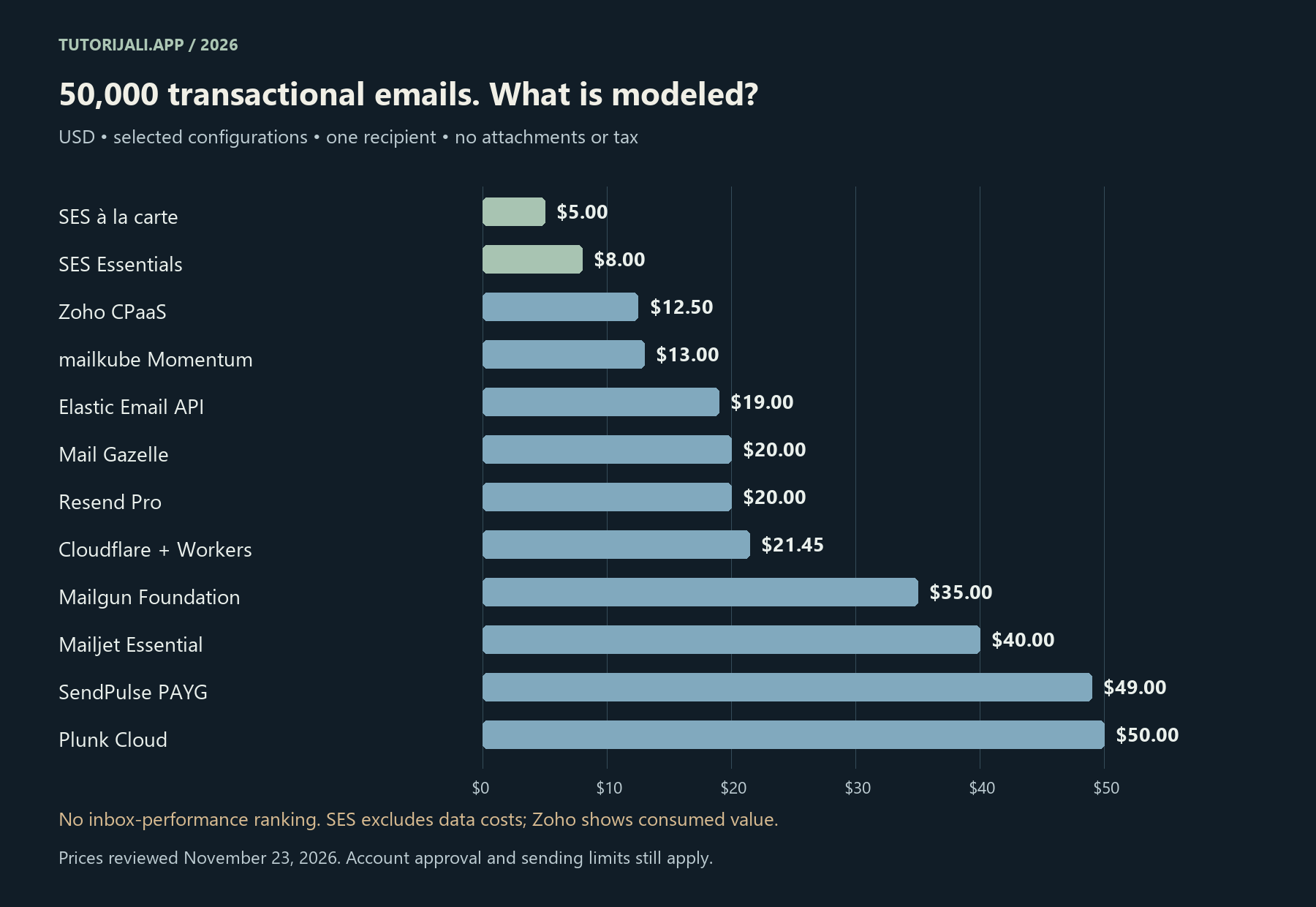
A dated arithmetic model, not a vendor invoice or deliverability ranking. Cloudflare includes the Workers minimum in this chart. The original chart remains in the original ZIP.
An $8 monthly transport saving is only 12 minutes at an assumed $40/hour labor rate. Migration, troubleshooting, templates, support and observability can outweigh a small sending-price difference. Put a value on operational time as well as the transport bill.
The supplied Python model uses Decimal and explicit plan cells. Publication data preserves those assumptions and records editorial corrections separately. Original model CSV, interactive data.
Three capacity scenarios on paper
Regular 10,000 per month
Over 30 days, average traffic is about 334/day. SendPulse Free can fit only when daily and hourly peaks also fit. Brevo Free reaches at most 9,000 over 30 days at 300/day. mailkube Launch fits the monthly volume at the selected $7 configuration, subject to 1,000/day. SES à la carte has a $1 sending base after the appropriate approvals, excluding data and other costs.
A business calendar can concentrate the same monthly count into fewer working days. Model actual arrival patterns rather than only the average.
3,000 codes in five minutes
This needs 10 recipients/second on average, with additional headroom for waves, retries and other API activity. mailkube Momentum at 6/second admits at most 1,800 over 300 seconds under a constant-rate assumption; Elite at 8/second gives 2,400. SendPulse Free's hourly allowance is far below the requested burst.
Resend's default 10 requests/second, using one request per message, is exactly at the required average with no reserve. Batch changes request arithmetic only where product semantics permit it. SES needs a verified production quota suitable for the burst. None of this measures delivery to the inbox.
5,000 invoices in one hour
A 6/second rate alone permits 21,600 attempts in an hour. A 5,000/day cap can still bind if other messages already consumed the day. The same provider's paid plan, free plan and sandbox can have very different outcomes.
For an initial upper bound, take the minimum of remaining monthly, daily and hourly budgets and confirmed rate × duration, applying only documented constraints. A fixed calendar reset, a rolling window and a token bucket are different models. The planner deliberately assumes one window, no reset during the burst and an initially empty queue. It is a capacity worksheet, not a provider load test.
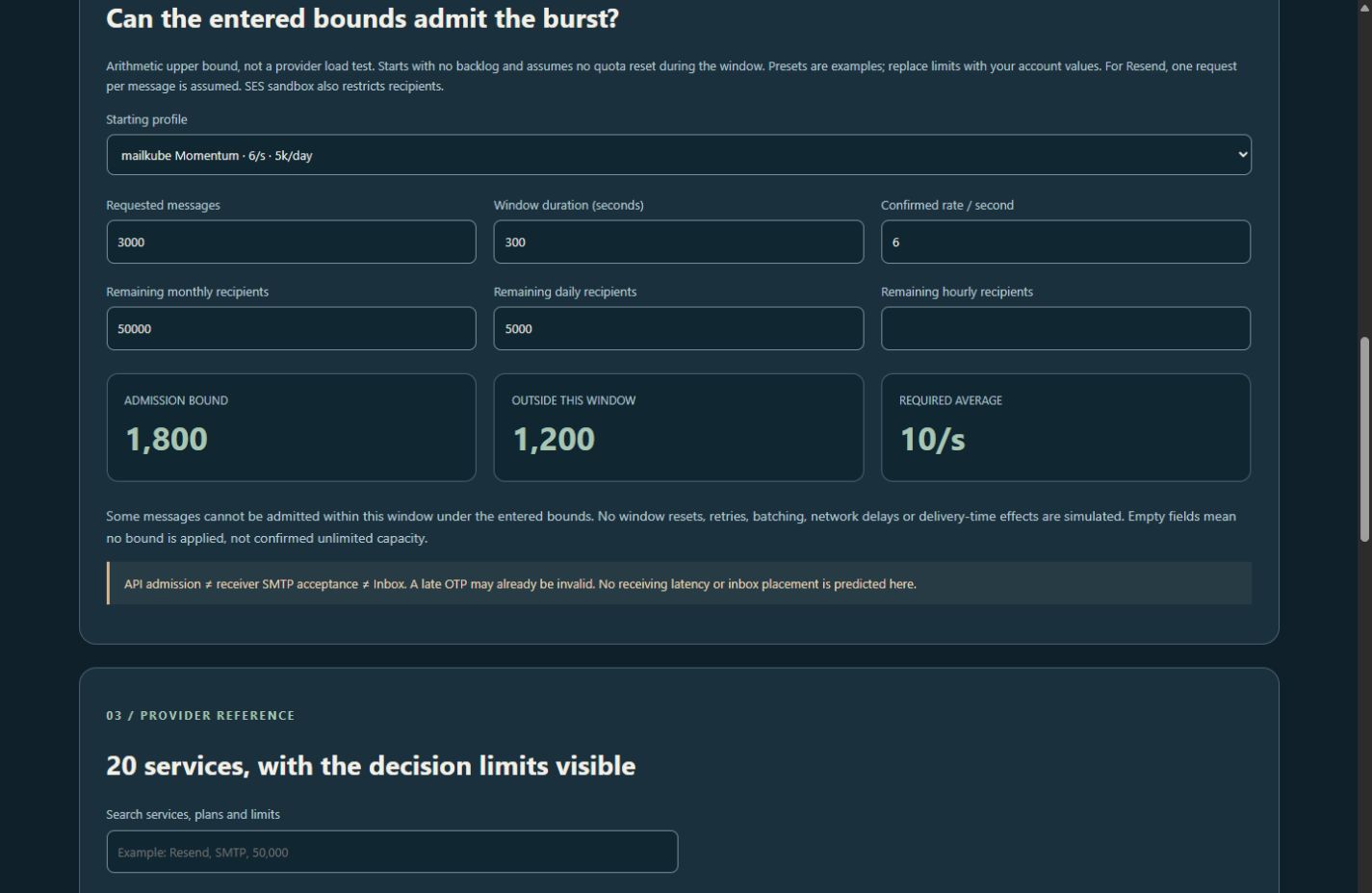
Explore the planning desk. Select one of the five modeled monthly volumes, inspect missing prices, search the provider reference and enter your confirmed capacity limits. The burst result is admission capacity, not SMTP acceptance, inbox arrival or a p95 latency prediction.
Build a production sending workflow
Persist the business event with an outbox
Write the application change and an outbox row in the same database transaction. A worker sends the message outside that transaction and records the provider ID and outcome. Use a stable event identifier such as invoice:2026-11:payment-842, with a database uniqueness constraint to avoid duplicate jobs.
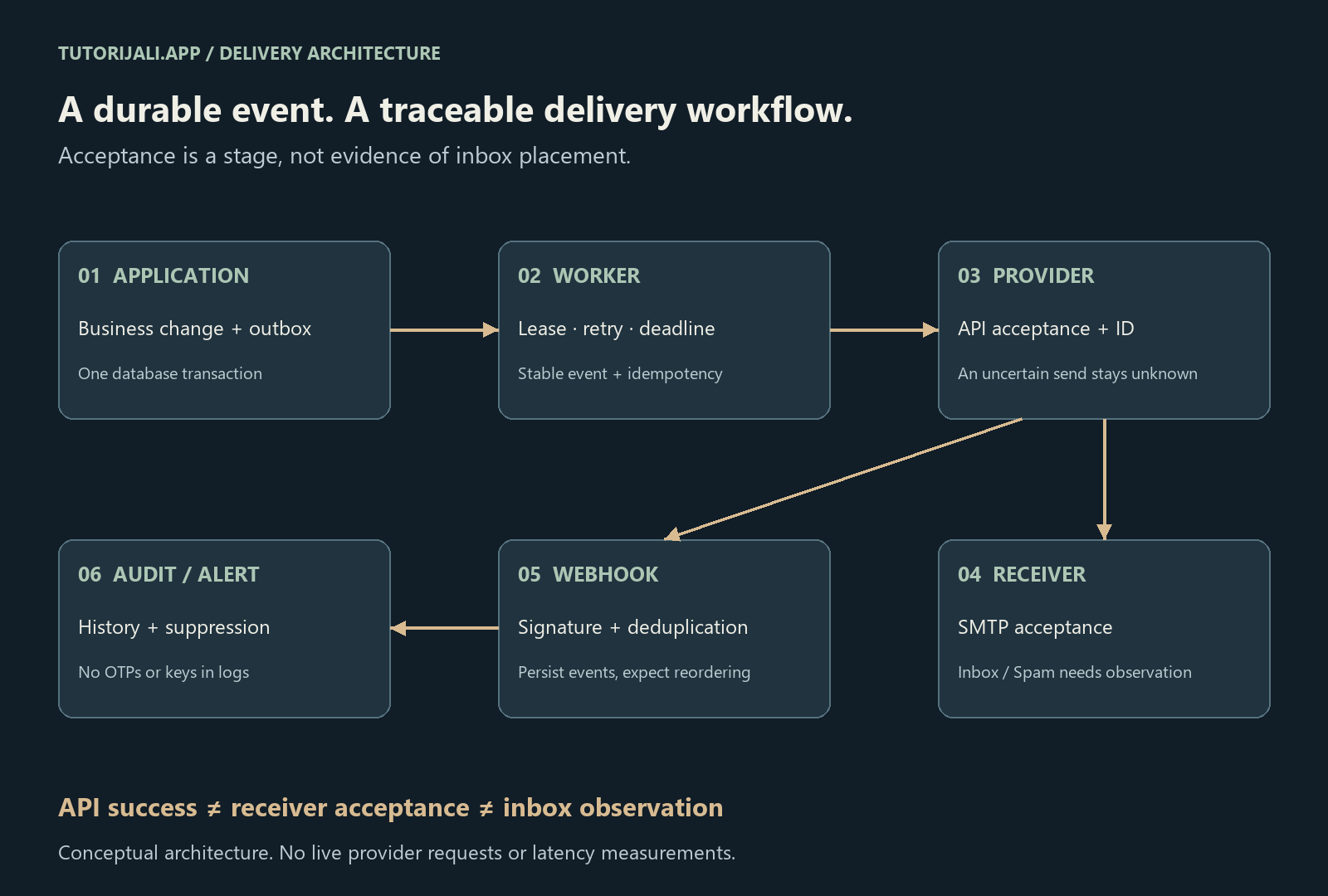
Workers can lease jobs with a bounded reservation period and atomic claiming. Retrying the same business event should preserve its payload and use the same provider idempotency key where supported. Resend documents a 24-hour key lifetime. Your application still needs its own history after that period. Resend idempotency.
SES SendEmail v2 does not document an equivalent client idempotency token. Its sending-process documentation describes uncertain outcomes where an error need not mean that nothing was accepted. Keep an unknown outcome, correlate stable event tags and inspect evidence before resending a sensitive invoice or switching providers. SES API, sending process.
Retry by failure category and deadline
| Event | Application response |
|---|---|
| Temporary request throttling | Respect Retry-After, use bounded backoff and jitter |
| Exhausted daily or monthly quota | Determine reset rules, alert, retain only useful unexpired jobs |
| Invalid domain, credentials or payload | Stop blind retries and repair configuration |
| Timeout after submitting a request | Reuse supported idempotency within its lifetime or reconcile the uncertain outcome |
| Temporary receiver SMTP failure after provider acceptance | Let the provider's documented SMTP retry proceed; do not immediately create another send |
| Hard bounce or complaint | Update suppression and enforce it on future sends |
| Expired OTP or reset link | Stop the job; a new user action creates a new event |
HTTP success, receiver acceptance and inbox placement are separate stages. A delivered event commonly reflects acceptance by the receiving server; it does not locate the message in Inbox rather than Spam. Opens can be affected by proxies and privacy tools. Track event IDs, timestamps, message category and reason codes without exposing OTPs or reset tokens in general logs. SMTP.
Configure authentication and separate traffic deliberately
SPF authorizes the relevant envelope identity; DKIM signs selected headers and content; DMARC evaluates alignment with the visible author domain. Publish an intentional configuration, inspect received headers and review reports before tightening policy. The current DMARC specification is RFC 9989, published in May 2026 and superseding the earlier specification. SPF, DKIM, DMARC.
Subdomains such as auth.example.com, billing.example.com and news.example.com can separate configuration and monitoring, but do not assume they evade a receiver's primary-domain bulk classification. Google's bulk-sender requirements include authentication and one-click unsubscribe for applicable marketing/subscription traffic. Keep OTP and password resets genuinely transactional. Gmail sender requirements, one-click unsubscribe RFC.
A dedicated IP needs sufficient regular volume and a warmup strategy. It is not automatically better than a well-managed shared pool. REST is convenient for structured errors, tags and idempotency; SMTP is convenient for existing applications. Inspect the capabilities of the selected transport.
Persist and deduplicate webhook events
Verify signatures over the original bytes using the provider's documented method. Apply timestamp/replay protections where defined. Persist the event before returning success, deduplicate by a stable event key and expect events out of order.
Keep history as well as current state: delivery, engagement and a later complaint can all apply to the same message. Monitor the oldest queued job, failure reasons, remaining quota and missing webhook deliveries. Prepare fallback domains, templates and suppressions in advance. Switching providers after an uncertain send can duplicate a message; it is not a universal retry policy.
Price attachments and retention separately
A 500 KB binary attachment in 10,000 messages represents about 5 GB before MIME overhead in decimal units. Base64 expands binary data by roughly a third before line breaks and headers. Providers can bill data, attachment allowance or additional message units differently. MIME encoding.
Data residency questions should cover the sending region, primary storage, logs, backups, subprocessors, support access and webhook payloads. “Sent from the EU” does not answer all of them. Long logs help support only when the retained information is appropriate and accessible.
Reproduce the model and plan a controlled sending pilot
The supplied research reports a local Resend dry run with an intercepted request and a validated SES JSON payload. That is a report from the package, not a new live send performed for publication. The publication workflow recalculates the cost table locally. No provider credentials were used and no real messages were sent.
Local model and mock request
Download the original package, inspect the scripts and run the model with Python 3.10+. The Resend example uses Node.js 22+ and its --dry-run mode substitutes a mock response rather than making an outbound request.
python3 model_cena.py
node resend-probe.en.mjs --dry-run
# Expected output of the English mock example, not a live send:
# Local probe: mock-msg-001
For a future authorized live pilot, provide the key through a secret manager or local environment, use a verified sender and a test mailbox you control. Reusing the same event and payload inside the idempotency window should be checked against both the returned ID and actual receiving evidence.
# RESEND_API_KEY must already be configured securely.
PROBE_FROM='notifications@your-verified-domain.example' \
PROBE_TO='your-controlled-test-mailbox@example.org' \
PROBE_EVENT_ID='probe-001' node resend-probe.en.mjs
These English examples are publication variants of the supplied scripts; the originals remain in the archive. Do not publish keys or treat a mock ID as a real delivery record. Resend Send Email API.
SES mailbox simulator
Use AWS CLI v2, an appropriate local profile, a verified sender and permission in the chosen region. Inspect and adapt ses-probe.en.json. A returned MessageId confirms request acceptance. Configure event destinations and correlate tags to inspect success, bounce and complaint simulations. Simulator use can be billed and does not measure inbox placement.
aws sesv2 send-email \
  --region eu-central-1 \
  --cli-input-json file://ses-probe.en.json
AWS CLI reference, SES simulator documentation.
Measure inbox latency with a declared method
Use controlled recipient accounts, comparable authenticated sending domains and paired time windows. Keep content, attachment cases and tracking comparable. Record domain/IP history as a possible confounder. Assign a non-sensitive run identifier.
An initial pilot can use at least 30 observations per group across several windows, but p95 from such a small sample remains rough. Record submission, API acceptance, delivery event, first observation in the mailbox, folder, expiry and failure reason. Synchronize clocks. Polling a mailbox every 15 seconds adds observation delay and uncertainty.
Report p50/p95 API acceptance and mailbox observation separately, plus spam placement, expiry misses and messages absent after a declared window. Repeat under an approved realistic sending quota before drawing production conclusions.
run_id,provider,recipient_family,submitted_at,api_accepted_at,delivery_event_at,first_seen_at,folder,expires_at,reason_code
Choose a shortlist for your scenario
| Priority | Starting candidates | What to establish |
|---|---|---|
| Recurring free volume with evenly spread traffic | SendPulse, Brevo, Mailjet | Busiest hour/day and expiry deadlines |
| A new application with a concise REST integration | Resend, mailkube | Actual throughput, logs and processing locations |
| Many domains on a small budget | mailkube, Mail Gazelle | Verification, billing availability, signed events and account limits |
| Irregular jobs without a fixed subscription | Zoho CPaaS, Scaleway TEM, SES | Credit expiry, quota approval and operating time |
| Existing AWS infrastructure | SES à la carte or the appropriate SES plan | Regional plan, production access and bounce handling |
| Existing paid Workers subscription | Cloudflare Email Service | Sending approval and account-level daily quota |
| Support that needs historical message evidence | Postmark; verify other retention offers | What the logs contain and your own minimal audit trail |
| Existing SMTP-based WordPress or ERP | SMTP2GO, Mailjet, Mailgun | Account price, TLS, sender verification and error tracking |
| Separate testing and live delivery | Mailtrap products as needed | Product-specific quotas and isolated credentials |
| An open-source control panel | Plunk self-hosted with suitable transport | Database, backups, updates and transport bill |
For a property-management SaaS, for example, login-code bursts and a monthly invoice batch should have separate priorities and deadlines. Existing AWS infrastructure can make SES a reasonable pilot, but support visibility and operating effort may justify a more packaged service. That is a shortlist to evaluate, not an inbox-performance ranking.
Frequently asked questions
Can 12,000 free messages all go out on one day? Not under SendPulse Free's listed 400/day and 50/hour limits. The headline monthly allowance assumes a sufficiently even distribution.
Why does MailerSend show both 100 and 500? The numbers describe daily API requests and monthly messages, respectively. Read endpoint and recipient-accounting rules before equating them.
Does every new SES account get 3,000 free monthly sends? Do not assume that. The July 2026 pricing change and general AWS credit terms need to be checked against the particular account. Sandbox limits are separate.
Do unlimited domains create a quota for every domain? Not necessarily. Account or organization quotas can be shared across all domains and keys.
Who has the best deliverability? This guide does not establish that. Controlled recipient-side evidence is required; a price table, dedicated-IP offer or marketing statement does not provide inbox p95.
Does delivered mean Inbox? It generally describes receiving-server acceptance, not folder placement or a human reading the message.
Can the planner send mail or access my account? No. It reads local publication data and calculates scenarios in the browser. It has no credential fields or sending endpoint.
Sources, downloads and publication notes
Each provider section links its pricing and operational documentation. The snapshot is dated November 23, 2026. Recheck the checkout, currency, billing period and account quotas before choosing a paid plan. The planner is intentionally limited to five modeled monthly volumes; it does not interpolate missing plan prices.
- Original package, unchanged
- Publication source bundle
- Original cost model
- Original model CSV
- Publication calculations and evidence notes
- Interactive pricing and capacity desk
The supplied source contains a reported mock request, not an inbox experiment. The hero is an AI illustration; the cost and outbox diagrams are generated from publication data/code; the desk screenshot shows the real local bilingual planner. Bird's request-tier correction and Mail Gazelle's conflicting Pro attachment rates are recorded explicitly.
Start with three numbers from your application: monthly recipients, the busiest five-minute burst and the longest useful delay for each message category. Calculate with those, verify reception in controlled mailboxes and select a plan with room for the actual workload.

JPEG XL and AV2 in 2026: a practical guide to image and video compression
How JPEG XL and AV2 work, what browsers support and what the supplied files actually show. A detailed guide with an interactive desk, commands and sources.

[Udemy] Succeed in the Age of AI with Dr. Angela Yu
Build practical AI workflows, write better code, and create an AI-augmented learning system in Dr. Angela Yu's course.

ChatGPT and Claude: 60 practical workflows, useful prompts and verifiable results
A complete working library for servers, apps, data, documents, content, media and automation, with copyable prompts and clear completion checks.
[Udemy] - Laptop Repair 101: Mastering Laptop Motherboard Diagnostics
Learn how to diagnose and repair issues with your laptop motherboard, including voltage testing, RAM, and CPU circuits.
HTML-in-Canvas in Chrome 157: live HTML in Canvas 2D, WebGL, and WebGPU
Real HTML forms, selectable text, and browser interactions inside a graphics scene. An in-depth API guide with the Chrome team’s actual video, a bilingual demo, diagrams, code, and practical limitations.
Next.js 16 and AI Agents: Production-Grade Master Guide
A comprehensive guide to building safer, scalable, high-performance Next.js 16 apps with AI coding agents, with Server Components, DAL/DTO architecture, Cache Components, and a production verification protocol.
Share your thoughts, questions, or tips about this article.