What does your browser reveal, and how much do protections help? Mozilla research, Safari identity resolution, precise statistics, practical advice, and a local lab with 12 signals.
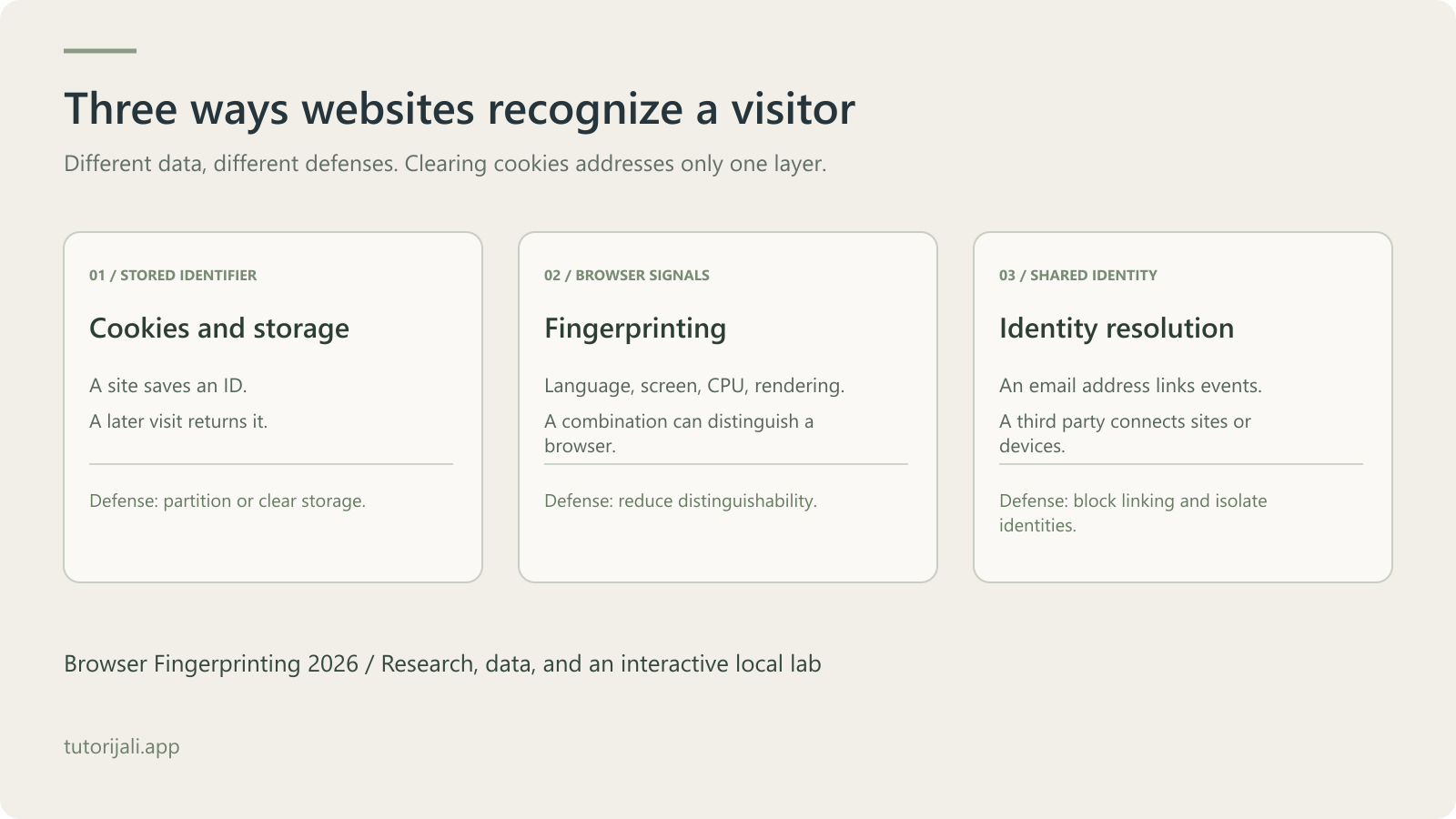
Browser tracking does not begin and end with cookies. A site can combine ordinary browser and device characteristics into a technical profile without saving a tracking identifier in local storage. Language, screen dimensions, graphics behavior, fonts, and a few hardware-related values can become informative when considered together.
The important distinction is between recognizing a browser environment and knowing the person behind it. A distinctive configuration does not automatically disclose a name, address, or phone number. Linking a technical profile to a person normally requires additional information.
Mozilla's November 2026 research provides a useful opportunity to examine this carefully. Its study covered 24,871,013 Firefox browser environments, measured between March 25 and April 17, 2026, and modeled the measurements used by three commercial fingerprinting systems. This article explains the published findings, their limits, and what readers can inspect locally. 12318
The headline results: modeled uniqueness fell from 75.7% to 46.8% for Fingerprint Pro, 60.9% to 38.5% for Signifyd, and 18.2% to 9.0% for Akamai. These describe uniqueness within the study's Firefox population and model. They are not the probability that an arbitrary visitor can be tracked, and they are not a ranking of Firefox, Safari, and Chrome.
Try the accompanying tools: Open the English local signals lab, download the published OS aggregates, or download the blank comparison template. Measurements in the standalone lab start only after a click and stay in the tab.
Read the timeline carefully: the study analyzes protection phases associated with Firefox 143. Mozilla's November 10 blog also mentions later changes shipped by Firefox 145. The paper separately labels Firefox 157 work experimental and other proposals under consideration. A publication date, an implemented protection, and a future experiment are different things.
Three different tracking mechanisms
Stateful tracking: cookies, storage, and saved identifiers
A server or page stores an identifier and reads it on a later visit. A session cookie that keeps someone signed in is an ordinary, useful example. The privacy concern comes from using identifiers to follow people across unrelated contexts.
Deleting local data can remove a stored identifier. It does not erase every other possible way to recognize the environment. Storage partitioning and restrictions on third-party cookies reduce opportunities to reuse state across sites.
Stateless fingerprinting: measuring the environment again
A page reads information exposed by the platform and evaluates how distinctive the combination is. There need not be a persistent identifier saved in the browser: a similar collection of measurements can be obtained on the next visit.
Fingerprints are not perfectly permanent. Updates, fonts, display scaling, language settings, graphics changes, and browser protections can change the measured values. Real systems must handle that instability and the possibility that unrelated users share the same profile.
Identity resolution: linking information already provided
WebKit's October 19, 2026 post describes another mechanism. A third party obtains an email address during a login or newsletter interaction, associates it with an opaque identifier, and uses that relationship to connect activity across sites or devices. Its infrastructure can remain useful even when a conventional cross-site cookie is blocked. 4
This is distinct from measuring browser characteristics. The common feature is that tracking can continue beyond traditional third-party cookies. Blocking specified resolver infrastructure also does not prove that every identity-based link has become impossible.
What can an ordinary website potentially learn?
This does not require administrator access to a computer. Many signals are ordinary platform properties; others arrive through normal network requests.
| Signal | Example source | Legitimate purpose | Potential identifying contribution |
|---|---|---|---|
| Language | navigator.language | Interface localization | Uncommon configurations can narrow a group |
| Time zone | Intl.DateTimeFormat().resolvedOptions().timeZone | Local time display | Can help distinguish environments |
| Screen dimensions | screen.width and screen.height | Responsive presentation | Combinations and scaling vary |
| Available screen area | screen.availWidth and screen.availHeight | Window placement | Can reflect taskbars, docks, or settings |
| CPU parallelism | navigator.hardwareConcurrency | Scheduling workers | Unusual reported counts may be informative |
| Graphics capabilities | WebGL | Choosing a renderer | Hardware, drivers, and rendering can differ |
| Canvas rendering | Canvas 2D | Graphics and image processing | Rasterization can vary between environments |
| Fonts | Layout or rendering behavior | Typography | Font availability can help narrow a profile |
| Touch support | navigator.maxTouchPoints | Input adaptation | Adds another characteristic |
| IP address | The network connection | Routing and security | Can connect activity or approximate location |
Not every browser exposes every value. Responses may be standardized, reduced, unavailable, or context-dependent. A property being readable does not by itself make it distinctive enough for useful tracking.
Why can eight metrics matter more than fifty?
For the Fingerprint Pro model, 80% of the users that the model identified as unique were already unique after eight metrics, although it collected more than fifty. For Signifyd, the corresponding point was nine metrics out of more than eighty. This does not mean that any eight measurements identify 80% of everyone online. It is conditional on the modeled service, metric order, and population. 2
The engineering lesson is to examine combinations. Blocking a large number of low-impact properties may accomplish less than carefully standardizing a small number of influential measurements.
Measuring uniqueness without inventing an anonymity score
Let N be the number of measured environments and n(f) the number sharing fingerprint f. An environment is unique in that dataset when n(f) = 1.
U = 100 × (number of singleton fingerprints) / N
This is sample uniqueness, not absolute anonymity. It depends on population size and composition, the selected signals, platform versions, the measurement date, and the model.
A profile shared by many people in a global population could still be unusual among the visitors to one small site. A percentage cannot be treated as a permanent property of the user.
Cohorts: equal uniqueness can hide very different distributions
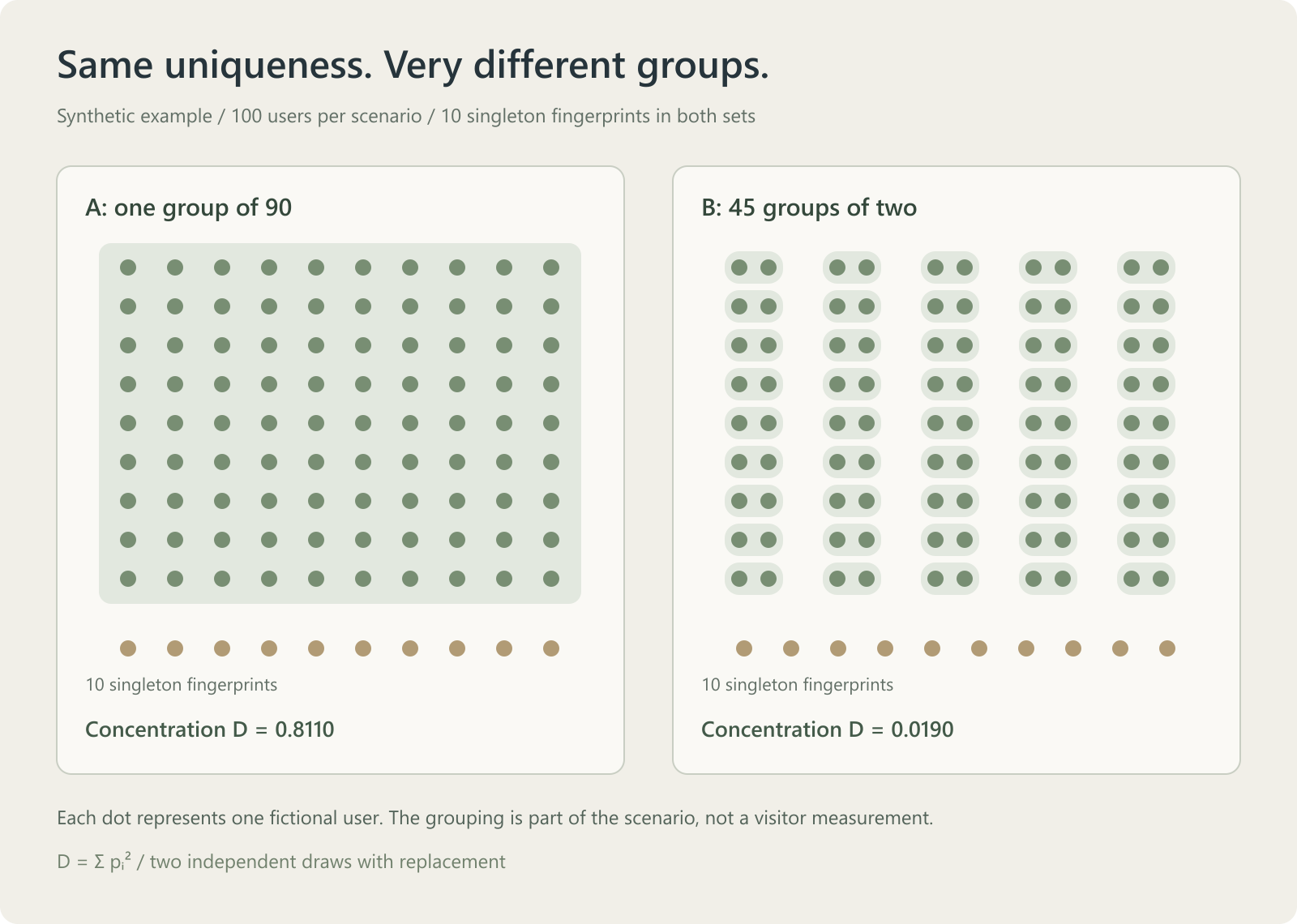
Consider two synthetic populations, each with 100 users and ten singleton fingerprints.
- Population A: the other ninety users all share one fingerprint.
- Population B: the other ninety users form forty-five groups of two.
Both have 10% uniqueness. In A, most people belong to a large shared group. In B, most belong to very small groups. Cohort size and distribution describe something the headline uniqueness percentage misses.
Shannon entropy is useful but insufficient
H(X) = -Σ p(x) log₂ p(x)
Entropy describes uncertainty in a distribution. A high-entropy individual property need not add much identifying information once other properties are known. Screen characteristics may be correlated with each other; a platform value can explain much of another signal.
The study therefore evaluates combinations and cohort structure rather than treating a ranking of individual entropies as a complete privacy assessment. 23
The published results, with the right interpretation
| Modeled service | Before protections | After protections | Change |
|---|---|---|---|
| Fingerprint Pro | 75.7% | 46.8% | 28.9 percentage points lower |
| Signifyd | 60.9% | 38.5% | 22.4 percentage points lower |
| Akamai | 18.2% | 9.0% | 9.2 percentage points lower |
These are rounded published study values. They are not benchmarks from our lab, commercial production matching rates, or a measurement of the share of people who are anonymous. 2
What did Firefox actually change?
CPU data: reduce unnecessary precision
navigator.hardwareConcurrency reports a browser-visible logical parallelism value that applications can use when scheduling work. An unusual value can also help distinguish an environment.
The study's phase 2 describes reporting 4 when the logical count is at most 4, and 8 otherwise. The compatibility reasoning matters: an earlier, stricter decision to report four more broadly affected video-encoding quality in Google Meet. More uniform values are not automatically a better mainstream product if ordinary applications stop behaving well. 3
Available screen height: the identifying detail may be the Dock
Available display dimensions can differ from full screen dimensions because of a taskbar, dock, scaling, or monitor configuration.
In the study's cumulative model, standardizing available screen resolution reduced macOS uniqueness by 25.3 percentage points, while the corresponding effect on the other three platforms was only 0-3 points. The weighted overall effect looks much smaller. This is a concrete reason to examine operating systems separately. 23
Fonts: preserve language support
Font availability can be identifying, but hiding every specialized font can break writing systems and typography. The paper describes making some font exposure depend on relevant locales rather than globally removing all variation. Privacy and functional internationalization need to be considered together.
Canvas randomization is a separate technique
Drawing the same shapes or text can produce slightly different raster output because of fonts, libraries, and graphics drivers. Context-dependent randomization can make such output less useful for linking activity.
The paper discusses deterministic, context-dependent noise and compatibility exceptions, including a Google Meet integration. The blog also distinguishes randomization benefits from the reported standardization measurements. Do not attribute the whole measured percentage reduction to Canvas noise.
Two locally identical Canvas images do not prove randomization is off. Two different images do not prove that it protects every context. A proper experiment must control the origin, session, browser version, and protection settings.
Experimental work must stay labelled experimental
The public table labels WebGL vendor/renderer standardization and storage quota work as Firefox 157 (Experimental). Later proposals, including other rendering or locale changes, are under consideration. These entries are not proof that every user has them enabled. 318
Safari: tracking through shared identity
Identity resolution connects a persistent identity signal, often an email address, to activity. Logging out of a site or unsubscribing does not by itself erase information a separate third party already received.
WebKit describes blocking network access to identified resolver infrastructure at the domain level in the relevant 2026 Apple platform releases. This targets a different surface from adjusting Canvas output or processor counts. It should not be described as complete elimination of fingerprinting. 4
Purpose also matters. A store can need an email address to send a receipt without using that address as a universal advertising identifier.
A controlled demonstration does not need real identities
The concept can be illustrated with an invented email and synthetic events. There is no need to involve actual readers, a commercial tracker, or a server that links their activity.
Our accompanying lab uses synthetic cohorts and individual local signals. It does not implement a real cross-site identity resolution service.
Where does Chrome fit?
Chrome has browser security systems, connection warnings, cookie controls, and measures that reduce some exposed browser details. These mechanisms do not all solve the same problem.
HTTPS protects data on the network path. It does not prevent a destination page from reading permitted JavaScript properties. Safe Browsing focuses on harmful sites and scams; it is not a promise that every ordinary environment measurement is blocked. 56
The relevant comparison is therefore specific: which signals are available, under which mode, with what stability and compatibility effects? The Firefox population study cannot supply a universal numerical ranking of Chrome, Firefox, and Safari.
Anonymity, privacy, and security are different goals
Private browsing primarily changes how certain local data is retained after a session. Some browsers also enable extra protections in that mode, but a private window alone is not anonymity.
A VPN changes the network path and the address normally seen by the destination. It does not automatically remove browser language, screen properties, logged-in accounts, or an email identity.
A tracker blocker can stop known scripts from loading. It cannot guarantee that all new, customized, or first-party code is prevented from measuring ordinary properties. Anti-fingerprinting reduces selected distinctions, while passkeys primarily strengthen authentication against phishing.
Common misleading conclusions
- A unique test result does not mean every site knows your name.
- A shared fingerprint does not prevent recognition through an account or another identifier.
- A changed result is not proof that all session linking has stopped.
- More extensions do not automatically mean more privacy; an unusual configuration can itself stand out.
- One test page cannot certify the anonymity of an entire device.
These tools can all be useful. Evaluate them against the particular risk you want to reduce.
Download the complete lab (ZIP) to run it on your own computer. The archive includes both languages, CSS, JavaScript, data, the Python calculation, and instructions.
Our local lab: inspect signals without creating an identifier
Open the English Browser Signals Lab.
The lab is a standalone static document with local CSS and JavaScript. It has no analytics library, cookies, persistent storage, result-upload endpoint, or stable fingerprint hash. It reads the displayed browser properties only when the user presses Run local check.
The initial requests for the document and its static assets are normal hosting requests and may appear in hosting logs. That is different from sending measured browser values after a click. The lab's own policy blocks outgoing connections.
What it measures
The twelve cards show the primary language, accepted languages, time zone, reported screen dimensions, available screen area, CPU parallelism, device pixel ratio, color depth, touch support, basic WebGL availability, viewport dimensions, and basic Client Hints if exposed.
The WebGL check tests availability without reading detailed vendor or renderer identifiers. It does not produce a Canvas pixel fingerprint, enumerate installed fonts, perform an audio fingerprint, or request high-entropy Client Hints.
What it does not claim
It does not combine the signals into a persistent ID, compare the reader against a central population, infer a personal identity, or estimate an anonymity percentage. It does not measure whether a commercial tracker can match the user's visits.
Repeating a local inspection
Download the lab files or serve their directory through a local HTTP server:
python -m http.server 8080 --bind 127.0.0.1
Open the lab, run the check, and record any comparison manually in the CSV template. Keep the operating system, display arrangement, scaling, language, and device unchanged between browser comparisons. Record the date, exact browser version, and protection mode.
Interpreting the result
A reported CPU count of eight does not establish that the machine has eight physical or logical processors. It may be standardized. Basic WebGL support does not show which detailed graphics signals a tracker can obtain.
Several browsers on one machine can support a useful case study. They cannot reproduce a population analysis of nearly 25 million browser environments.
A synthetic cohort simulator
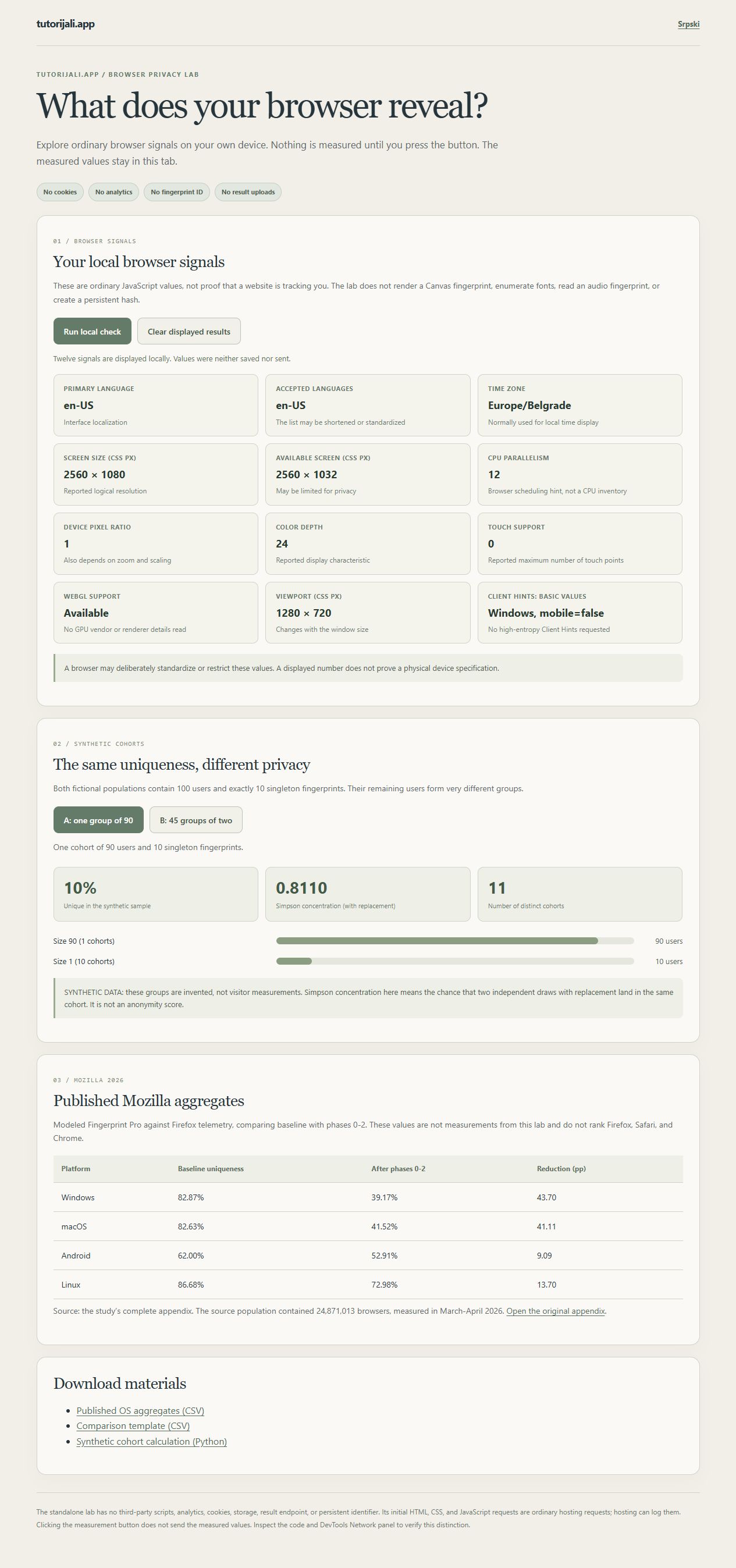
The simulator compares two fictional populations of 100 users. Ten are singletons in each. Switch between a shared group of ninety and forty-five groups of two to see how identical uniqueness percentages can hide very different cohort structures.
SYNTHETIC DATA is an explicit label, not a disclaimer buried elsewhere. These are not visitor records or Mozilla telemetry. The real published OS aggregates appear separately with their source.
The screenshot records a functional run of this standalone lab in the in-app browser. It is not an independent Firefox/Safari protection benchmark.
Limits of the large Mozilla study
The study is stronger than an anonymous test page with an unexplained visitor sample, but its boundaries still matter.
- Its population is relevant Firefox release users, not all internet users.
- The commercial services are modeled from analyzed measurements. Their private production systems may behave differently and change over time.
- Operating system, configuration, signal combinations, and population composition affect the results.
- IP-based tracking is outside this protection model.
- Detailed extension characterization is not covered by the analysis.
- Changes after the collection period can change browser behavior and tracker capabilities.
- Browser protections must preserve compatibility; forcing everyone into one identical profile is not a simple mainstream solution.
The result does not establish that the remaining share is anonymous to every organization.
Privacy of the research itself
The research used a dedicated user-characteristics ping rather than simply treating normal telemetry as a fingerprinting dataset. The published account describes no persistent client identifier in that ping, OHTTP separation of network identity and content, limited access, deletion of individual records, and publication of aggregates and analysis material. 123
Privacy decisions were part of collection design. They were not merely a policy statement added after building a detailed identity database.
Practical steps for users and developers
For everyday users
Keep the browser and operating system updated. Protections often require changes in the browser itself.
Review supported tracking-protection modes. In Firefox, Standard and Strict have different trade-offs. A stricter mode can affect particular sites. Diagnose the specific breakage rather than disabling protection everywhere.
Treat accounts as a separate identity channel. A service can associate activity with a signed-in account even if the browser profile is common.
Think about email reuse. Separate addresses or aliases can reduce simple identity linking across services, though they do not guarantee anonymity.
Understand the limits of VPN and private browsing. They address particular layers, not every tracking mechanism.
Do not optimize blindly for a test site's percentage. A result without a population, model, and methodology is not a rigorous personal privacy score.
For site owners and developers
Collect only the characteristics needed for a feature. Avoid undeclared cross-site identity linking. Let the application work when processor counts are standardized, graphics details are reduced, or rendering output changes.
Do not treat hardwareConcurrency as a hardware inventory. Avoid unnecessary third-party scripts and explain the purpose of necessary integrations. Legitimate fraud prevention should use proportionate, documented, purpose-limited signals instead of silently building a permanent cross-site profile.
What could an independent follow-up measure?
A useful follow-up would compare exposed signals on the same machine across clearly recorded browser versions and modes, repeat measurements within and across sessions, and record compatibility effects.
Define the hypothesis, environment, and evidence first. Publish non-identifying comparison values with the method and failures. Distinguish a local case study from a representative population analysis.
Do not collect a new visitor fingerprint database merely to make an educational article look more substantial. The lab can explain the measurement surface without collecting readers' results.
Define a threat model before choosing a defense
Ask who is observing, what they can access, and which link you want to prevent.
| Observer or scenario | Relevant capability | A useful question |
|---|---|---|
| A page's own code | Reads permitted platform properties | Does it need these values for its function? |
| A third-party script | May run with significant page access | Can it be removed, isolated, or constrained? |
| A network observer | Sees network metadata according to the connection | Which information does encryption or a relay hide? |
| A signed-in service | Already has an account identity | What purpose and retention apply to linked activity? |
| An identity resolver | Can connect shared identity signals | Is third-party access blocked or minimized? |
What is outside this article's goal?
This is not a defense against a compromised operating system, malware with broad local access, a malicious extension with extensive permissions, or every form of targeted surveillance. A browser signal lab cannot certify that those threats are absent.
The scope is ordinary web tracking mechanisms, measured browser exposure, published mitigations, and cautious interpretation.
Mathematical appendix: uniqueness and cohort structure
Uniqueness in a sample
For groups of sizes n₁, n₂, … with total population N, sample uniqueness is the fraction of people in groups of size one. Count singleton people, not every distinct group.
Simpson concentration
For this article's synthetic example, let pᵢ = nᵢ/N and define:
D = Σ pᵢ²
This is the chance that two independent draws with replacement land in the same group.
A: (90/100)² + 10 × (1/100)² = 0.811
B: 45 × (2/100)² + 10 × (1/100)² = 0.019
The same 10% uniqueness therefore corresponds to very different concentration. A larger concentration here means more probability mass is in shared cohorts. It is not a probability that someone's real identity is known.
If sampling two different people without replacement, the expression is different:
D_without_replacement = Σ nᵢ(nᵢ - 1) / [N(N - 1)]
State which convention is used. Describing both formulas as simply “the Simpson index” without a definition can reverse or confuse comparisons.
Shannon entropy
The accompanying script gives approximately 0.8012 bits for A and 5.7439 bits for B. Entropy distinguishes their distributions, but it does not directly measure how a commercial system links changing visits.
Conditional information is particularly important. Once the operating system or a related screen property is known, another seemingly variable property may add very little.
Three separate quantities
Uniqueness: how many profiles have no identical partner in a dataset.
Stability: how an environment's measured values persist or change over time.
Linking success: whether a system correctly assigns multiple events to the same environment, including mistakes.
High uniqueness can coexist with poor stability. Low uniqueness can coexist with successful linking through other data. Our lab measures none of these as a personal tracking score; its cohort calculation uses invented populations.
The standalone Python calculation uses only the standard library:
from math import log2

def summarize(groups):
    total = sum(groups)
    probabilities = [size / total for size in groups]
    return {
        "unique_pct": 100 * sum(size == 1 for size in groups) / total,
        "simpson_with_replacement": sum(p * p for p in probabilities),
        "entropy_bits": -sum(p * log2(p) for p in probabilities),
        "expected_cohort_for_random_user": sum(size * size for size in groups) / total,
    }
The expected cohort size for a randomly selected user is 81.1 in A and 1.9 in B. This differs from simply dividing the population by the number of cohorts.
Why operating system segmentation matters
The public appendix lets readers compare the baseline and completed protection phases 0-2 for one modeled service:
| Operating system | Baseline unique | After phases 0-2 | Reduction in percentage points |
|---|---|---|---|
| Windows | 82.87% | 39.17% | 43.70 |
| macOS | 82.63% | 41.52% | 41.11 |
| Android | 62.00% | 52.91% | 9.09 |
| Linux | 86.68% | 72.98% | 13.70 |
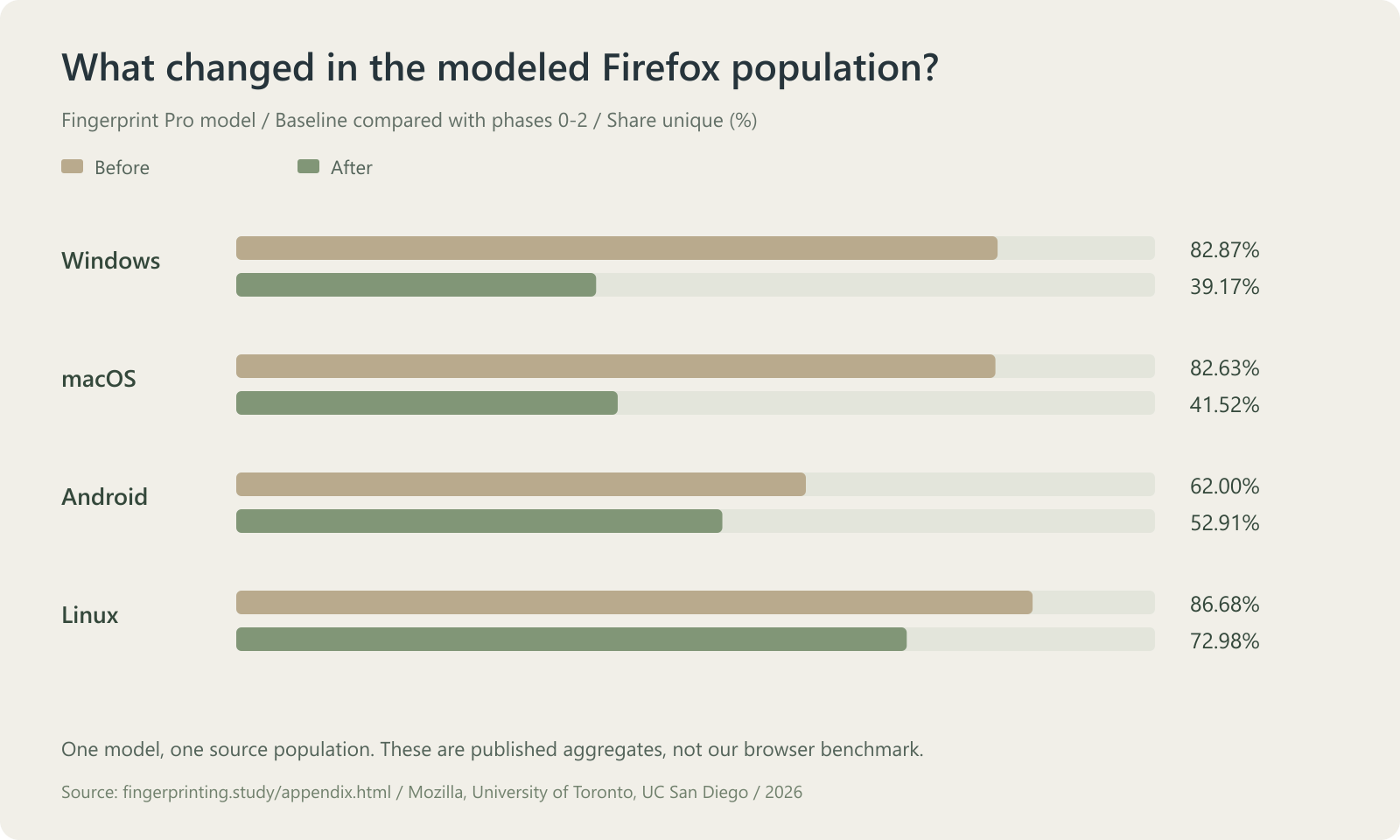
These are cumulative modeled results for a Firefox source population. They are not a direct privacy ranking of operating systems. The baseline distribution, available properties, implementation choices, and correlations all affect the result. 18
The overall number is not the simple average
The appendix defines overall as a population-weighted mean of the four OS populations, not the arithmetic average of these four percentages and not the statistic of one undivided population.
Do not average 39.17, 41.52, 52.91, and 72.98 and label the result Mozilla's overall value. The required platform weights are not determined by those four percentages. Our accompanying CSV therefore preserves the OS rows and source rather than inventing a new aggregate.
What else is in the public tables?
The appendix includes service/platform baselines, cumulative changes, individual protection effects, distributions and correlations, and explanations of material withheld because it could improve tracking techniques.
That is a useful publication model: open enough to examine the findings, with explicit limits on what was measured and what is disclosed.
Research architecture without an identity database
The collection period and population matter, but so does data flow. The published description uses a dedicated collection event, no persistent client ID in the special ping, and a per-collection identifier for deduplication rather than a long-lived cross-site identity. 2318
OHTTP separates network identity from request content
With Oblivious HTTP, an intermediary can see the sender's network address without decrypting the request contents. The destination receives the contents through that intermediary without receiving the original sender IP.
This separates information held by the two parties. It is not a guarantee against collusion, nor does it fix an application that inserts directly identifying information into the payload. Collection policy, access restrictions, and minimizing identifiers remain important. 18
Retention, aggregation, and rare values
The project describes a 90-day retention period for individual records followed by deletion. Published single-characteristic aggregates suppress very rare values, including those seen in fewer than 100 users within the relevant OS population.
The combination of a dedicated event, identifier minimization, network/content separation, controlled access, and deletion is more informative than a generic claim that a project values privacy.
Why our educational lab collects less
Teaching readers about exposed signals does not require a new population database. Values remain in the standalone tab, are not hashed into a stable token, and can be cleared from the display.
Reproducing a population study would be a separate project with its own sampling, consent, governance, and research design. It is unnecessary for the accompanying demonstration.
Passive and active fingerprinting
Passive signals
A server or infrastructure can observe some properties through normal communication, without a page running additional JavaScript: network addressing, certain headers, language preferences, timing patterns, and protocol characteristics.
That availability does not prove a server uses them to identify someone. It does explain why privacy analysis must consider more than the JavaScript API list. W3C guidance explicitly considers the passive surface. 13
Active signals
An active measurement reads a property or runs an operation: language, available screen height, Canvas rendering, or WebGL support, for example. Such operations can be legitimate. Combining unnecessary measurements to recognize people is a separate design decision.
User-Agent reduction and Client Hints
Chrome reduced the precision of portions of the default User-Agent string. More detailed values can be available through User-Agent Client Hints, depending on browser support and policy.
It is inaccurate to say the User-Agent has simply disappeared. Information is exposed differently, and additional requests can reveal selected details. MDN documents limited support and policy controls for NavigatorUAData.getHighEntropyValues(). 1617
Permissions-Policy: ch-ua-high-entropy-values=()
This is an illustrative restriction for the relevant API in supporting browsers. It does not remove all fingerprinting properties, and its support and effect are not universal.
Why manually disguising everything can backfire
An unusual combination of spoofed User-Agent, resolution, fonts, and extensions can stand out more than a common browser configuration.
Consistent, population-wide mitigation is different from every user constructing a rare profile. Evaluate whether a change reduces the distinctions that matter in the relevant population.
Firefox, Safari, and Chrome: compare mechanisms
“Which browser is most private?” is incomplete without a scenario. Blocking third-party scripts, reducing exposed measurements, preventing email linking, and hiding a network address are different goals.
Firefox
Mozilla distinguishes blocking known fingerprinters from restricting information exposed to suspected fingerprinters. Protection availability depends on version and mode. Strict and private browsing can add restrictions beyond the usual mode. 711
The paper's Firefox 143 protection phases and the blog's later Firefox 145 changes describe different scopes in the implementation timeline.
In the interface, review Settings → Privacy & Security → Enhanced Tracking Protection. If a specific site breaks, investigate a site-specific exception and report the problem rather than disabling protection globally.
Safari
Apple describes reducing exposed system configuration detail so more devices look similar. On Mac, review Safari → Settings → Privacy → Prevent cross-site tracking. 14
WebKit's October 2026 identity resolution blocking addresses identified network infrastructure. This is distinct from standardizing a graphics or screen property. 4
Chrome
Chrome exposes User-Agent reduction, Client Hints, and third-party cookie controls. On desktop, review Settings → Privacy and security → Third-party cookies. Google documents third-party cookie blocking in Incognito by default. 1517
Those controls should not be represented as proof that every active signal is standardized or that the Firefox study measured Chrome privacy.
A mechanism map
| Problem | Firefox | Safari | Chrome | Remaining questions |
|---|---|---|---|---|
| Known tracking scripts | ETP and blocking lists | Tracking prevention mechanisms | Depends on controls and ecosystem | New, customized, or first-party code |
| Third-party cookie state | Total Cookie Protection and ETP | Cross-site tracking controls | Third-party cookie settings | Accounts and legitimate first-party data |
| Distinctive browser signals | Selected standardization and randomization | Reduced device configuration detail | User-Agent reduction and other measures | Other APIs, stability, and combinations |
| Shared email identity | Complementary measures such as aliases | Specific resolver infrastructure blocking | Requires a scenario-specific assessment | Identity given directly to a service |
| Network identity | Separate network protection question | Separate network protection question | Separate network protection question | Relay trust, endpoints, and account use |
This map compares purposes and mechanisms. It is not a measured ranking.
How separate properties become identifying
A simplified chain is: expose ordinary values, combine them, compare the combination against a population or previous observations, then possibly connect the result with other identifiers.
Each step has uncertainty. A rare value can change. A shared combination can belong to several users. Matching software can produce false positives and false negatives. A login can make a sophisticated fingerprint unnecessary for that particular service.
Three properties that are easy to overinterpret
CPU count: a reported scheduling hint may be capped and is not a machine inventory.
Available screen size: dock, taskbar, scaling, and mitigation choices can affect it.
WebGL availability: a yes/no capability check does not establish that detailed renderer values or a stable graphics fingerprint are exposed.
The lab reports individual values with explanations, rather than silently treating each one as reliable evidence of a unique person.
Design a comparison that supports its conclusions
Questions and hypotheses
- On the same machine and OS, do browsers expose different values?
- Does changing a supported protection mode alter selected responses?
- Do stricter modes affect specific legitimate features?
- Are local readings stable within a session and across a restart?
These can be investigated without creating a long-lived identifier. They do not directly estimate a commercial service's matching success.
Control the environment
Record the date, full browser version, OS and version, device type, scaling, monitor arrangement, privacy mode, extension state, enterprise policies, and updates during the experiment.
Possible test groups include Firefox Standard, Strict, and Private; regular and private Safari on a supported Apple device; and regular Chrome and Incognito. Do not present an emulator as an actual Safari session.
Repetitions and comparison data
Run each inspection at least three times in the same session and after reopening the browser. This is a practical suggested protocol, not a claim that three repeats establish statistical sufficiency.
Record values manually in the provided template. A one-person case study can describe an observed difference; it cannot estimate whole-population uniqueness.
Supported and unsupported conclusions
| Observation | Supported conclusion | Unsupported conclusion |
|---|---|---|
| One browser reports CPU=8 and another CPU=16 | The reported API values differ in these contexts | One is twice as private |
| Strict mode changes available screen height | The mode or related configuration affects the response | No tracker can link the sessions |
| WebGL works in both browsers | The basic API is available | Both expose identical graphics fingerprints |
| A test page reports uniqueness | The profile may be distinctive in its sample or model | Every site knows the person's real name |
| The synthetic simulator gives D=0.811 | The invented cohort distribution has that concentration | Real visitors have the same distribution |
Check whether results leave the lab
Open DevTools Network, let the standalone document finish loading, clear the network list, and press the measurement button. The code has no result-upload call, storage write, remote script, analytics integration, or endpoint that receives the measured values.
An initial request for HTML, CSS, or JavaScript is not a result upload. Hosting can log those requests. Extensions, browser services, and other software outside the document are separate from what its code does.
Useful applications with fewer unnecessary measurements
Detect the needed capability
Instead of inferring support from a device brand or User-Agent string, test the feature:
const supportsWebGL2 = (() => {
  const canvas = document.createElement("canvas");
  const context = canvas.getContext("webgl2");
  const supported = Boolean(context);
  context?.getExtension("WEBGL_lose_context")?.loseContext();
  return supported;
})();

if (supportsWebGL2) {
  startWebGL2Renderer();
} else {
  startSimplerRenderer();
}
The renderer functions are application placeholders. The capability result makes a functional decision rather than becoming a persistent identity token.
Treat hardwareConcurrency as advice
const advertised = navigator.hardwareConcurrency ?? 2;
const workerCount = Math.max(1, Math.min(4, advertised));
This does not guarantee four workers are optimal. A serious scheduler should also respond to observed performance. The property is not a safe claim about the physical CPU.
Minimize data by task
Localization rarely needs a central record of every language and a precise OS model. Responsive layout often needs CSS media queries rather than visitor-resolution logging. A graphics editor may need WebGL support without retaining every exposed GPU detail.
Fraud prevention can use purpose-limited, proportionate signals. Embeds deserve review because another party may load code in a context permitted by browser policy.
Security policies are useful but not magic
CSP limits resource sources and script execution according to policy. It does not automatically stop permitted first-party code reading ordinary properties. Permissions Policy can constrain selected capabilities and, where supported, high-entropy Client Hints.
An illustrative policy for a simple static page is:
Content-Security-Policy: default-src 'self'; object-src 'none'; base-uri 'none'; form-action 'self'; frame-ancestors 'none'
Permissions-Policy: ch-ua-high-entropy-values=(), geolocation=(), microphone=(), camera=()
Referrer-Policy: strict-origin-when-cross-origin
Adapt this to the actual app. A production site may require documented embeds or features that this example blocks. CSP alone is not an anti-fingerprinting system.
Test compatibility as well as exposure
An application should behave reasonably when measurements are standardized or absent. The paper's compatibility examples involving video, graphics, and fonts explain why privacy work cannot stop at making a table of values look uniform.
Frequently asked questions
Does deleting cookies delete a fingerprint? It removes or resets some stored state. A profile can be measured again from remaining environment properties.
Does private browsing stop fingerprinting? Not by itself. Some modes add protections, but their effects depend on browser version and settings.
Does a VPN solve it? It changes the visible network address and route. Browser properties, accounts, and shared email identities can remain.
Can fonts identify a browser? Font availability can contribute. Whether it is enough depends on the population and other properties.
Why report eight CPU units on a machine with more? A browser may deliberately standardize the scheduling hint. It is not a hardware inventory guarantee. 39
Can a page list every installed program? A standard page has no general unrestricted API for listing desktop applications. Inferring selected capabilities is a different thing.
Is a fingerprint an IP address? No. Network addressing and browser characteristics are different inputs, though a system may combine them.
Can two people share a fingerprint? Yes. Shared cohorts are central to both the analysis and the mitigation strategy.
Does a unique profile expose personal details? Not necessarily. Technical distinctiveness does not automatically reveal name, address, or phone number.
Can an update change the profile? Yes. Software, fonts, rendering, and protections can change. Linking consequences depend on the model.
Does blocking third-party cookies stop all tracking? No. Other state, browser measurements, accounts, and shared identities can remain.
Are many privacy extensions always better? No. They add trust requirements and can create an unusual configuration. Choose necessary, reputable tools and maintain them.
Why is my time zone still visible? It supports ordinary functions, and browsers make compatibility decisions. Removing every difference is not a simple mainstream solution.
Can browsers eliminate fingerprinting completely? Broad elimination can require substantial functionality restrictions. Practical work reduces distinctions and unnecessary access rather than promising universal invisibility.
Do Safari, Firefox, and Chrome have identical rules? No. Implementations, defaults, and modes differ. A Firefox-only source population cannot establish a direct numerical comparison.
Why is some study material withheld? The authors describe avoiding publication of analyses that could directly help build stronger tracking systems. 2
Does tracker blocking hide my IP? Not automatically. Network masking is a separate question from script blocking.
Can ads and video embeds load tracking code? Depending on their source and permissions, they can. That does not mean every ad or video does so; review the actual integration.
Can I publish my local results? Inspect the values first. A screenshot can reveal configuration details you may prefer not to share. The lab does not upload it automatically.
Does this lab score my anonymity? No. It is a signal inspector and synthetic cohort simulator, not a population-based identity or anonymity test.
A glossary
| Term | Meaning in this guide |
|---|---|
| Fingerprint | A collection of characteristics that can help distinguish browser environments |
| Fingerprinter | A system that gathers or combines those characteristics |
| Stateful tracking | Tracking that uses stored state or identifiers |
| Stateless tracking | Recognition without depending on a saved browser identifier |
| Cohort | Environments sharing the same profile in a particular model |
| Uniqueness | The share with no identical partner in a specific dataset |
| Entropy | A measure of uncertainty in a distribution |
| Simpson concentration / HHI | A concentration measure, with a stated sampling convention |
| Standardization | Deliberately making exposed values more alike |
| Randomization | Controlled variation intended to make stable linking harder |
| OHTTP | Separating the relay's knowledge of the sender IP from the destination's request content |
| ETP | Firefox Enhanced Tracking Protection |
| Client Hints | A mechanism for requesting selected browser or device information |
| Identity resolution | Connecting events through shared identity signals such as an email address |
| Compatibility breakage | Loss of expected app behavior after a protection or platform change |
A checklist for reading fingerprinting claims
Before trusting a percentage or a browser ranking, ask:
- Which population and collection dates does it describe?
- Is it a model, a local observation, or a production matching result?
- Which operating systems and browser modes are included?
- Were protections deployed, experimental, or only proposed?
- Is uniqueness being confused with stability or successful linking?
- Are cohort concentration and its sampling convention defined?
- Is an overall figure correctly weighted?
- Are the browser version, OS, and conditions available?
- Are synthetic illustrations clearly labelled?
- Does the demonstration transmit or retain measured values?
- Are compatibility and accessibility considered?
- Can the method and calculations be repeated?
- Do citations lead to original research and documentation?
- Are limitations stated as clearly as the headline finding?
The aim is a reasoned choice about browser settings, identity reuse, and third-party exposure, not a promise that deleting cookies makes someone invisible.
Where the data and conclusions come from
There are four distinct kinds of material:
- Published research results: Mozilla's population, modeled uniqueness, and OS aggregates, linked to their sources.
- Mathematical illustrations: formulas and strictly synthetic cohorts reproducible with the Python file.
- Local demonstration code: individual browser properties inspected in the standalone tab.
- Editorial interpretation: practical explanations and design advice, not invented measurements.
No independent cross-browser population benchmark is claimed. If such a study is performed later, it needs its own environment records, method, dates, repeat measurements, and limitations.
The supplied package also contained a screenshot reported as taken in headless Chromium 144. The screenshots used here show the updated localized lab in the in-app browser; neither type establishes behavior in every browser or a real tracking success rate.
Conclusion
The useful finding is that carefully chosen changes to a small set of exposed characteristics can reduce measured uniqueness while preserving ordinary web use. Fingerprinting has not disappeared, and identity resolution shows why post-cookie tracking is broader than graphics or device properties.
When a claim promises a personal anonymity percentage, ask which data, population, model, and time period support it. Without those answers, the number has little technical meaning.
Readers can inspect their own exposed signals without sending us a new fingerprint. Developers can build useful applications with fewer measurements, less retention, and better behavior when browsers protect privacy.
Sources and further reading
- Mozilla Security Blog: Open research, stronger privacy, November 10, 2026.
- Mozilla, University of Toronto, and UC San Diego: Fingerprinting in the Wild.
- Ritter et al.: extended CCS 2026 research paper.
- WebKit: Blocking Identity Resolution Infrastructure, October 19, 2026.
- Google Security: Chrome now warns before insecure HTTP connections.
- Google Security: Defenses against evolving web scams.
- Mozilla Support: Resist Fingerprinting.
- Mozilla Support: OHTTP explained.
- MDN: Navigator.hardwareConcurrency.
- MDN: Screen.availHeight.
- Mozilla Support: Firefox's protection against fingerprinting.
- WebKit: Tracking Prevention Policy.
- W3C: Mitigating Browser Fingerprinting in Web Specifications, September 25, 2025.
- Apple Support: Prevent cross-site tracking in Safari on Mac.
- Google Chrome Help: Delete, allow, and manage cookies.
- MDN: NavigatorUAData.getHighEntropyValues().
- MDN: User-Agent reduction.
- Fingerprinting in the Wild: complete appendix tables.
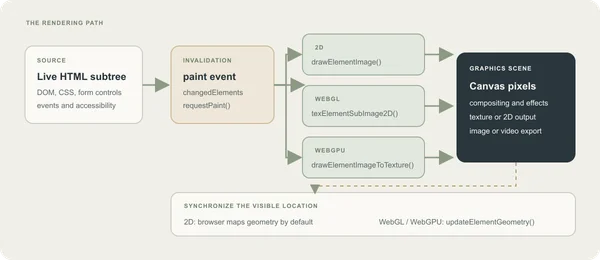
HTML-in-Canvas in Chrome 157: live HTML in Canvas 2D, WebGL, and WebGPU
Real HTML forms, selectable text, and browser interactions inside a graphics scene. An in-depth API guide with the Chrome team’s actual video, a bilingual demo, diagrams, code, and practical limitations.

What can apps really see in your phone’s photo library? Android, iPhone and privacy
One photo or the entire library? An in-depth investigation of permissions, MediaStore, PhotoKit, EXIF and upload evidence, with an interactive explainer and source for a native experiment.
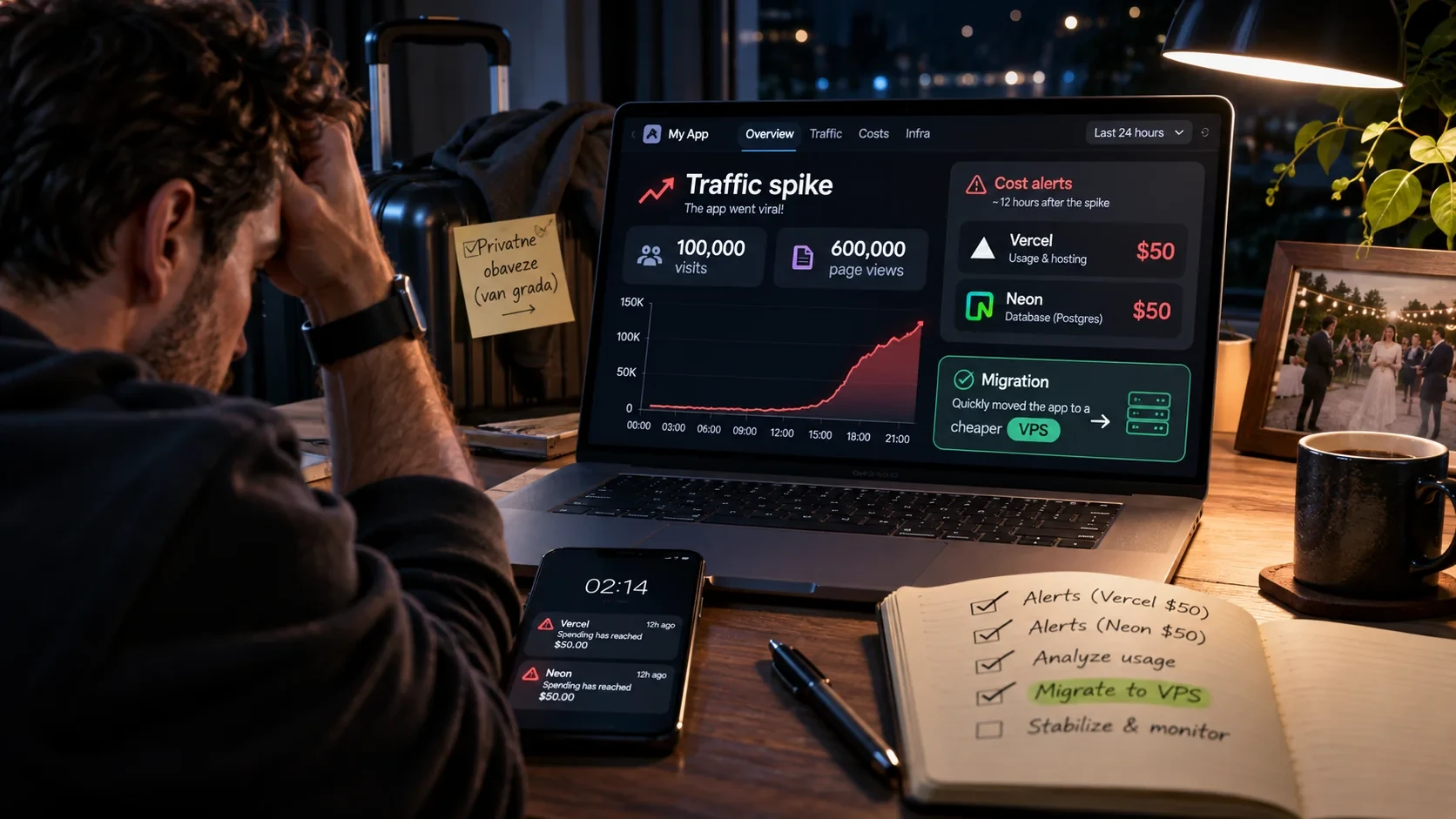
When an App Goes Viral: How I Spent $100 on Vercel and Neon in 12 Hours and Why I Moved to a VPS
My app about public officials' assets got 100,000 visits in a day, and within 12 hours spending hit $50 on Vercel and $50 on Neon. An in-depth guide to pricing, optimization, budgets and moving to a VPS, with an interactive calculator.

Self-hosted email in 2026: control, costs and a real outage experiment
Does your email keep working when the primary server fails? Domains, software, networking, costs and recovery, with real Postfix/Dovecot trials, raw observations and a separate 24-hour model.
How to Check for and Remove Suspicious ScreenConnect on Windows
A safe, evidence-first guide to checking whether a ScreenConnect installation is authorized, reviewing Windows indicators, and getting help with removal.

How to Build Your Own VPN in 2026: Free or for a Few Euros per Month
A complete guide to building your own VPN in 2026, with cost comparisons, WireGuard, Tailscale, wg-easy v15, Cloudflare Mesh, nftables, security, and step-by-step tutorials.
Share your thoughts, questions, or tips about this article.